
TL;DR
Automated customer support uses AI to answer and resolve routine shopper questions on website chat, WhatsApp, Instagram, and email, day and night. Named Zipchat stores automate 75% to 85% of inquiries. This guide ranks which tickets to automate first, gives a seven-step launch plan, and shows the KPIs that prove it’s working.
What Is Automated Customer Support?
Automated customer support is software that answers, guides, or resolves customer questions without a human agent typing the reply. In e-commerce customer support, it covers order tracking, returns, sizing, and policy questions across every channel a shopper uses.
You’ll also see it called customer support automation, customer service automation, or support automation. The idea is the same. An AI agent reads your store’s content, understands what the shopper is asking, and replies in seconds.
It runs where your customers already are: the chat widget on your site, WhatsApp, Instagram DMs, Facebook Messenger, and email. It works on Shopify, WooCommerce, Magento, BigCommerce, and Wix.
How it works
A modern AI support agent follows four steps on every message:
- Learn. It crawls your site, catalog, policies, and FAQs, then stores them as a searchable knowledge base.
- Understand. It reads the shopper’s message and works out the intent, even with typos or a different language.
- Respond. It answers from your content, recommends a product, or looks up live data like an order status.
- Escalate. When it can’t resolve the question with confidence, it hands the conversation to a person with the full transcript.
Old rule-based chatbots skipped step two. They matched keywords to canned replies and broke the moment a shopper phrased something oddly. That’s why so many stores still distrust the word “chatbot.”
Answer, guide, act: the three levels of automation
Automation isn’t an on/off switch. It’s a graded capability, and treating it that way is the safest route to launch.
| Level | What the AI does | Ecommerce example | Risk if wrong |
|---|
| Answer | Replies with information from your content | ”What’s your return window?” | Low: a wrong answer is easy to correct |
| Guide | Walks the shopper to a decision or next step | Sizing advice, product comparison, return instructions | Medium: can cost a sale or cause a return |
| Act | Takes an action in another system | Looks up an order, creates a discount code, starts a return | Higher: touches money, orders, or customer data |
Start at “answer.” Move to “guide” once replies are accurate. Turn on “act” last, one tool at a time.
Why Ecommerce Stores Automate Support Instead of Hiring
Automated support scales with ticket volume. Headcount scales with salaries. That gap widens every peak season.
A human team has fixed hours, a fixed number of hands, and a hiring lag of weeks. An AI agent answers at 3 a.m. on Black Friday in the shopper’s own language. It doesn’t need a rota.
The business case rests on three changes:
- 24/7 coverage. Shoppers in other time zones get answers while your team sleeps.
- Faster first response. Replies land in seconds, not hours, which matters most for pre-sale questions. AI can bring average first response time under 30 seconds because nobody waits in a queue.
- Lower cost per contact. Once the AI resolves a ticket, that ticket costs a fraction of an agent’s time.
Answers decide sales, too. 83% of online shoppers are likely to abandon a site or product page that doesn’t give them the information they want and buy from a competitor instead (Syndigo, August 2026).
The cost of scaling support manually
Manual support has a simple, painful math. Double your orders, and you roughly double your tickets. Double your tickets, and you need more agents, more training, and more management.
Most stores don’t hit a wall all at once. They hit it in November. Response times slip, reviews mention “no reply,” and the founder ends up answering tickets at midnight.
The WISMO tax
“Where is my order?” is the question every store answers on repeat. Many report it as their single largest contact reason, especially after a sale or a carrier delay.
Every WISMO ticket costs agent time and teaches the shopper nothing new. The answer already sits in your order system. That’s why order tracking is the first thing most stores should automate ecommerce support around.
Proactive support: reach customers before they write in
Proactive support means contacting the shopper before the problem becomes a ticket. AI can warn customers about shipping delays before they ask: with Zipchat, you can send a WhatsApp message to the segment of affected orders.
Telling customers about a delay first means fewer angry emails later. It also protects the customer experience, since a shopper who hears about a problem early is far more forgiving than one who discovers it.
On-site, proactive chat works the same way. A message can open when a shopper lingers on a size chart or moves to leave the page. Handled well, proactive support builds trust, and trust is what brings customers back.
Which Support Tickets You Can Automate (and Which You Can’t)
In most stores, the bulk of tickets are repeat questions with answers already on the site. Automate those first. Keep people on the rest.
Use this matrix to rank your own contact reasons. “Readiness” combines how often the AI can resolve the ticket alone with how much damage a wrong answer does.
| Contact reason | Automation readiness | Level to use | Why |
|---|
| WISMO / order tracking | High | Act (order lookup) | The answer lives in your order data. Shopify connects natively; other platforms use a custom order lookup API. |
| FAQ and policy questions | High | Answer | Shipping costs, return windows, and payment options are already written on your site. |
| Product and sizing questions | High | Guide | The AI reads specs, size charts, and materials from your catalog. It can also suggest an in-stock alternative. |
| Stock and availability | Medium-high | Answer / guide | Works well when your product feed is current. Stale stock data creates wrong promises. |
| Returns and exchanges | Medium | Guide, then act | Explaining the policy is safe. Starting a return needs a connected returns system and clear rules. |
| Discount requests | Medium | Act, with limits | On Shopify, the AI can create single-use percentage codes up to a cap you set. Without a cap, don’t enable it. |
| Refunds and cancellations | Low | Escalate | Money leaves the business. Keep a human approving these. |
| Complaints and edge cases | Low | Escalate | An angry customer wants to be heard by a person, not answered by a policy. |
Two patterns stand out. Anything the AI can answer from content is ready now. Anything that moves money or calms anger belongs with a person, at least at launch.
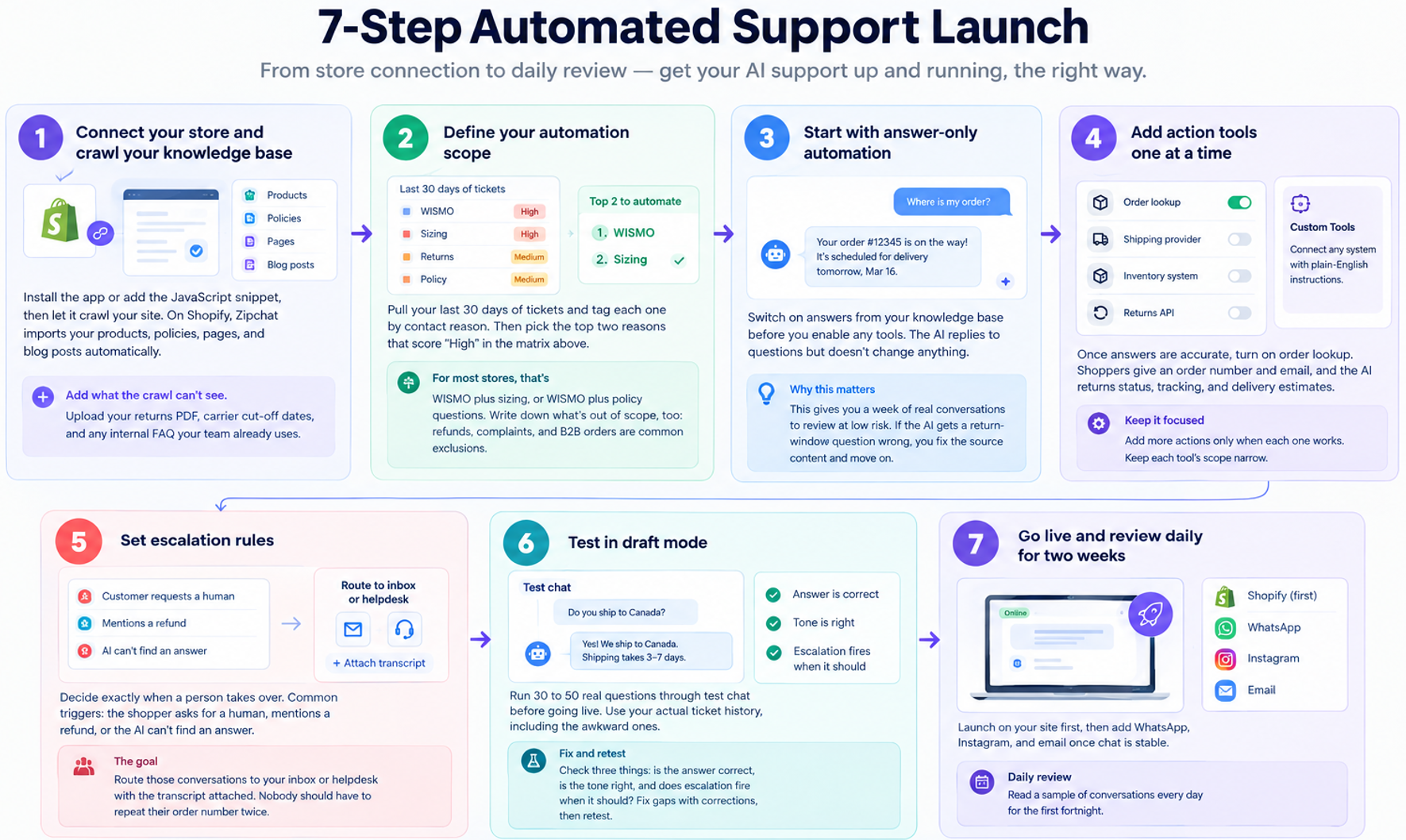
How to Set Up Automated Customer Support: 7 Steps
You can install and train an AI support agent in an afternoon. The steps below keep that speed without the usual launch mistakes.
Step 1: Connect your store and crawl your knowledge base
Install the app or add the JavaScript snippet, then let it crawl your site. On Shopify, Zipchat imports your products, policies, pages, and blog posts automatically.
Add what the crawl can’t see. Upload your returns PDF, carrier cut-off dates, and any internal FAQ your team already uses.
Step 2: Define your automation scope
Pull your last 30 days of tickets and tag each one by contact reason. Then pick the top two reasons that score “High” in the matrix above.
For most stores, that’s WISMO plus sizing, or WISMO plus policy questions. Write down what’s out of scope, too: refunds, complaints, and B2B orders are common exclusions.
Step 3: Start with answer-only automation
Switch on answers from your knowledge base before you enable any tools. The AI replies to questions but doesn’t change anything.
This gives you a week of real conversations to review at low risk. If the AI gets a return-window question wrong, you fix the source content and move on.
Once answers are accurate, turn on order lookup. Shoppers give an order number and email, and the AI returns status, tracking, and delivery estimates.
Add more actions only when each one works. With Zipchat’s Custom Tools, you can connect a shipping provider, inventory system, or returns API in plain-English instructions. Keep each tool’s scope narrow.
Step 5: Set escalation rules
Decide exactly when a person takes over. Common triggers: the shopper asks for a human, mentions a refund, or the AI can’t find an answer.
Route those conversations to your inbox or helpdesk with the transcript attached. Nobody should have to repeat their order number twice.
Step 6: Test in draft mode
Run 30 to 50 real questions through test chat before going live. Use your actual ticket history, including the awkward ones.
Check three things: is the answer correct, is the tone right, and does escalation fire when it should? Fix gaps with corrections, then retest.
Step 7: Go live and review daily for two weeks
Launch on your site first, then add WhatsApp, Instagram, and email once chat is stable. Read a sample of conversations every day for the first fortnight.
Zipchat also flags questions the AI struggled with and suggests corrections for you to approve. That turns week-one mistakes into week-two answers. If your customers write in several languages, add multilingual support in any language at this stage.
Examples: Support Automation in Action
Real results come from stores that scoped automation to their most repetitive questions first. Here’s what that looks like.
Named results from Zipchat stores
- Tropicfeel (travel footwear and gear, global) automated 85% of customer inquiries. It covers product features, country-specific shipping, and returns, with a 16% chat-to-sale conversion rate. (Tropicfeel success story)
- Family Nation automated 80% of customer inquiries. (Family Nation success story)
- CFS.it reduced more than 75% of its support workload, selling medical devices where answers must be precise. (CFS.it success story)
The spread matters. Even with a regulated catalog, CFS.it cleared 75%+, which puts it at the lower end of the range for good reason.
Scenario 1: A fashion store automating sizing and WISMO
Illustrative numbers. A fashion brand gets 1,200 tickets a month. Its tagging shows 40% are order tracking, 25% are sizing, and the rest are mixed.
It launches answer-only on sizing in week one, then adds order lookup in week two. By month two, the AI resolves most of those 780 WISMO and sizing tickets without an agent.
The two-person team now spends its time on exchanges and VIP customers. Nobody was hired for peak season.
Scenario 2: A supplements store automating ingredient and subscription questions
Illustrative numbers. A supplements brand fields 600 tickets a month. About half ask about ingredients, dosage timing, or allergens. Another 20% ask how to pause or skip a subscription.
Ingredient questions are “answer” tickets: the facts sit on each product page. Subscription changes need an “act” tool connected to the subscription app, so the store starts by explaining the steps instead.
Medical questions (“Can I take this with my prescription?”) go straight to a person. That rule protects both the customer and the brand.
Common Mistakes That Break Support Automation
Most failed launches share the same few causes. None of them are about the AI model.
Automating complaints too early
Complaints need empathy and judgment. An AI quoting your returns policy to a furious customer makes things worse. Keep complaints human until the rest of your automation is stable.
No clear escalation path
If shoppers can’t reach a person, they’ll leave or leave a bad review. Every automated channel needs a visible way out: a “talk to a human” option and a fast handoff.
A stale knowledge base
The AI is only as current as your content. Change your shipping cut-off but not your policy page, and the AI will promise dates you can’t meet. Schedule rescans and update pages when policies change.
Hiding the human option
Some stores bury the handoff to push deflection numbers up. It backfires. Shoppers who feel trapped stop trusting every answer, including the correct ones.
Measuring volume, not resolution
“The AI handled 3,000 conversations” says nothing about whether customers got answers. Track resolutions and satisfaction, not message counts. The KPI section below shows how.
When Automated Support Fails or Isn’t Worth It
Automated support fails when there’s too little to automate or too much risk in each answer. Check your store against these thresholds before you launch.
| Condition | Threshold | What to do |
|---|
| Low ticket volume | Under about 100 tickets a month | Start on the entry plan, or wait. The time saved may not justify setup. |
| Thin knowledge base | Fewer than 10 pages covering products and policies | Write your FAQ, shipping, and returns pages first. The AI can’t answer what isn’t written. |
| Complaint-heavy mix | Complaints and disputes above 30% of tickets | Fix the root cause (shipping, quality) before automating. Automation won’t calm angry customers. |
| Bespoke or custom products | Most orders need a quote or consultation | Use AI to qualify and route, not to resolve. |
| Regulated advice | Medical, legal, or financial questions | Automate product facts only. Escalate anything that sounds like advice. |
If two or more of these apply, start small. Automate one contact reason, measure it for a month, then decide.
Metrics and KPIs to Track
Measure automated support on resolution and satisfaction. Volume alone will flatter a bad setup.
The four core KPIs
Deflection rate    = Self-serve resolutions / Total AI attempts x 100
Automation rate    = Tickets resolved by AI / Total tickets x 100
CSAT gap           = CSAT on AI conversations - CSAT on human conversations
First response time = Time from customer message to first reply
Deflection rate tells you how often the AI succeeds when it tries. For a full breakdown, see our ticket deflection guide.
Automation rate tells you how much of your total workload the AI now carries. CSAT gap is your quality check: if AI conversations score far below human ones, you’ve automated too much too soon. For more on satisfaction scoring, see our guide to customer service KPIs.
Worked example
Illustrative numbers. A store receives 2,000 tickets in a month. The AI attempts 1,900 and resolves 1,500 without a person.
Deflection rate = 1,500 / 1,900 x 100 = 78.9%
Automation rate = 1,500 / 2,000 x 100 = 75%
Now the cost side. Zipchat’s ROI calculator uses $5 per ticket as its ecommerce default. At that rate, 1,500 resolved tickets save $7,500 a month.
At about 2.5 AI replies per conversation, 1,900 attempts use roughly 4,750 replies. That fits Zipchat’s Scale plan (6,000 replies, $480 a month billed annually, per the pricing page).
Net monthly saving = $7,500 - $480 = $7,020
ROI = ($7,500 - $480) / $480 x 100 = 1,462.5%
Swap in your own ticket count and cost per ticket. If your AI resolves fewer than 96 tickets a month on this plan, the saving no longer covers the cost.
A quick diagnostic
- High deflection, falling CSAT: the AI is closing conversations it shouldn’t. Tighten escalation rules.
- Low deflection, stable CSAT: the AI is escalating too often. Add missing content to the knowledge base.
- Rising first response time: handoffs are piling up in the human queue. Check staffing on escalations.
Where Ecommerce Support Automation Is Heading in 2026+
Support automation is moving from answering to acting. The next wave of AI agents won’t only explain your return policy; they’ll start the return.
Four shifts are already visible:
- Agentic support. AI agents call tools and APIs to look up orders, update subscriptions, and create returns. The limit is no longer the model; it’s how safely you connect your systems.
- Conversational post-purchase. Order updates, delivery issues, and review requests move from one-way emails to two-way chats on WhatsApp and Instagram.
- Language by default. Shoppers expect answers in their own language. Stores selling across borders will treat multilingual support as a baseline, not an upgrade.
- Voice notes and images. Customers already send photos of damaged items and voice notes on WhatsApp. Support agents that understand both will resolve more on first contact.
The measurement will change too. “Tickets deflected” gives way to “issues resolved end to end.” Stores that track resolution now will be ready for that shift.
FAQ
What is automated customer support in ecommerce?
Automated customer support in ecommerce uses AI to answer and resolve shopper questions without a human agent. It covers order tracking, returns, sizing, and policy questions across website chat, WhatsApp, Instagram, and email. It runs 24/7 and hands complex cases to your team.
Can you automate customer support without losing quality?
Yes, if you start with high-confidence tickets and keep a human handoff visible. Compare CSAT on AI conversations with CSAT on human ones every month. If the gap widens, narrow the AI’s scope until quality recovers.
Which customer support tasks should be automated first?
Start with order tracking (WISMO), FAQ and policy questions, and product or sizing questions. They’re frequent, answerable from your own content or order data, and low-risk if the AI makes a mistake. Leave refunds and complaints with people at launch.
How much of customer support can realistically be automated?
Named Zipchat stores automate 75% to 85% of inquiries, including CFS.it (75%+), Family Nation (80%), and Tropicfeel (85%). Expect less in your first month. Knowledge base quality, ticket mix, and connected tools move the number most.
Does automated support work on WooCommerce and Magento, or only Shopify?
No, it isn’t Shopify-only. Zipchat crawls any store and installs with a JavaScript snippet on WooCommerce, Magento, BigCommerce, and Wix. Shopify adds native extras like built-in order lookup and discount codes. Other platforms can connect order lookup through a custom API.
How do I measure support automation success?
Track four KPIs: deflection rate, automation rate, CSAT on AI versus human conversations, and first response time. Resolution and satisfaction matter more than conversation volume. Review them weekly for the first month, then monthly.
When should a store not automate support?
Hold off if you get fewer than about 100 tickets a month, have little written content, or face mostly complaints. Regulated products need extra care. Automate product facts only and send anything that sounds like advice to a person.
How long does it take to set up automated support?
Installing the app and crawling your store takes minutes. Plan about an hour to add missing content and test real questions before launch. Tuning continues for the first two weeks as you review live conversations.
Start With Two Ticket Types, Not Twenty
The stores that get the most from automated customer support don’t automate everything on day one. They pick the two most repetitive contact reasons, switch on answers only, and measure.
Do that this week. Tag last month’s tickets, pick your top two “High” readiness reasons, and run them through test chat. You’ll know within 14 days whether your deflection rate and CSAT justify the next step.
Want to see it on your own store? Start a 7-day free trial and put your top two ticket types on autopilot.