WISMO stands for “Where Is My Order.” It covers any message from a customer asking where a purchase is or when it’ll show up. It’s often the most repetitive contact an ecommerce support team handles.
You cut WISMO in two moves. Tell shoppers what’s happening before they think to ask. Then let an AI agent answer the rest from real order data, on whatever channel they use and in whatever language they write in.
If you run support, you know the Monday after a long weekend. “Any update?” “Tracking hasn’t moved since Thursday.” “¿Dónde está mi pedido?” Each one takes a couple of minutes. There are hundreds of them, and none of them are hard.
What does WISMO mean?
WISMO is the support team’s shorthand for order-status questions. “Where’s my package?” “When will it arrive?” “Has it shipped yet?” and “My tracking says delivered, but I don’t have it” all count. You’ll also see the term WISMO tickets, order status inquiries, or, for refunds, WISMR (“where is my refund”).
The WISMO meaning is narrow on purpose. It’s about orders that already exist, so pre-sale shipping questions (“How long does delivery to Canada take?”) are a different category. That line matters when you measure it, which we’ll get to.
Zipchat’s page on how to automate WISMO covers the product side. This guide covers the why and the how-to.
Why WISMO requests pile up
Shoppers don’t write in because they’re impatient. They write in because something in the post-purchase experience went quiet, or something looked wrong.
Narvar surveyed 3,461 US online shoppers for its 2025 State of Post-Purchase report. Two-thirds said they feel anxious after clicking buy. 74% had a late delivery in the past year, and 86% hit at least one delivery issue (Narvar via Retail Technology Innovation Hub, November 6, 2025).
Those numbers come from a vendor-run survey, so weigh them as such. But the causes behind them are easy to spot in any inbox.
The “label created” gap
A carrier often shows “label created” for a day or more before the parcel is picked up. To the shopper, it looks like nothing is happening. To your warehouse, everything is on schedule. That mismatch alone produces a steady trickle of tickets.
Tracking that stalls
Parcels change hands between carriers, hubs, and customs. Scans go missing. A tracking page that hasn’t moved in three days reads as “lost” to most people, even when the box is sitting on a truck.
Vague or missing delivery dates
“Ships in 3 to 5 business days” leaves too much room for doubt. Narvar found 73% of shoppers say an estimated delivery date influences whether they buy at all (Narvar via RTIH, November 6, 2025). If the date is fuzzy before checkout, expect questions after it.
Peak season and cross-border orders
Transit times stretch in November and December, and WISMO climbs while other question types stay flat. Cross-border orders add customs holds and handoffs to local carriers with different tracking numbers. Both push the WISMO share of your inbox up, fast.
One shopper, three channels
Someone who gets no answer on chat tries email, then sends a WhatsApp message. Now one parcel has created three tickets. Your agents may answer all three without noticing.
What WISMO costs a support team
Here’s the awkward part. You’ve probably seen “WISMO is 40% of all tickets” quoted somewhere, or that WISMO inquiries climb to 50% of requests during peak season.
Don’t borrow someone else’s number. Yours takes ten minutes to calculate, and it’ll hold up better when customer service costs come up in a budget meeting.
WISMO rate          = WISMO contacts ÷ orders shipped
Monthly WISMO cost  = WISMO contacts × minutes per contact ÷ 60 × loaded hourly cost
Measure the rate against orders, not against total tickets. Orders tell you whether logistics is causing the contacts. That makes the rate a check on supply chain visibility: how well your fulfillment keeps shoppers informed.
A 2.5% WISMO rate, for example, means 25,000 WISMO inquiries for every 1 million orders shipped.
A worked example
Take a store that ships 6,000 orders a month. Say 1 in 10 orders triggers a WISMO contact, each takes 4 minutes with the lookup, and an agent costs $25 an hour loaded. These are inputs for the arithmetic, not benchmarks.
| Input | Normal month | Peak month (rate doubles) |
|---|
| Orders shipped | 6,000 | 6,000 |
| WISMO contacts | 600 | 1,200 |
| Agent hours | 40 | 80 |
| Monthly cost at $25/hour | $1,000 | $2,000 |
The dollar figure is rarely what hurts. It’s the 40 to 80 hours of an agent copying tracking numbers while a refund dispute waits in the queue.
Those are customer service resources pulled away from work that needs a person. Weeks of copy-paste replies also wear a team down, and repetitive queues are a common path to burnout and turnover.
What it costs the customer experience
A slow answer about a late parcel turns a logistics problem into a customer experience problem. Veho, a delivery company, surveyed 1,954 US online shoppers in 2026. 40% had stopped buying from a retailer after a package never arrived, and 33% after a late delivery (Veho via RTIH, August 6, 2026).
Delivery also shapes customer satisfaction more than many teams expect. In the same survey, 26% said delivery decides how satisfied they are with a purchase more than the product itself.
How to reduce WISMO tickets with proactive communication
The cheapest WISMO ticket is the one nobody sends. Automated notifications cut inbound volume because they answer the question before anyone asks it. Set them up before you automate any replies.
- Show a real delivery date before checkout. Swap “3 to 5 business days” for a date range on the product page and cart. Zipchat’s smart ETA predictions answer “when will it arrive?” in chat before the order is placed.
- Send updates at the moments that create questions. Order confirmed, shipped, out for delivery, delayed. Narvar found that 38% of shoppers say frequent tracking updates reduce their anxiety, and nearly half prefer SMS, push, or WhatsApp for urgent ones (Narvar via RTIH, November 6, 2025).
- Say something during the “label created” gap. One line in the shipping email does it: “Your tracking may not update until the carrier scans your parcel, usually within 24 hours.”
- Warn people about delays first. When a carrier slips, message the affected orders before they message you. A delay you announce is a note. A delay they discover is a ticket.
- Give tracking a home on your own site. A tracking page on your domain, linked from every email, keeps people away from five carrier sites.
- Tag WISMO and review it every week. Note which status the order was in when the customer asked. If most questions arrive at “label created,” fix the email, not the inbox.
None of this removes WISMO completely. People still ask; they ask on their phone at 11 pm, and they ask in their own language. That’s the part an AI agent takes over.
How an AI agent answers order status from real order data
A useful order-tracking bot doesn’t guess or recite your shipping policy. It looks up the specific order and tells the shopper what’s happening with it.
Here’s how Zipchat’s order lookup handles a WISMO request:
- The shopper asks where their order is, in chat, email, WhatsApp, or a social DM.
- The AI agent asks for the order number and the email used at checkout.
- It looks up that order in your store data. Both details have to match, so nobody can check someone else’s parcel.
- It answers from the record: status (processing, shipped, delivered), tracking link, shipment details, and an estimated delivery date.
- If something’s off, like a delay or a “delivered” parcel that never arrived, it explains what it can and hands the conversation to your team.
A typical exchange looks like this (illustrative, not a real customer):
Shopper: hi, ordered sneakers last week, nothing yet??
AI agent: Sorry for the wait. Can you share your order number and the email you used at checkout?
Shopper: #48213, maria.r@example.com
AI agent: Thanks, Maria. Order #48213 shipped on Tuesday and is with the carrier now. Expected delivery is Thursday. Here’s your tracking link.
That’s a 30-second conversation. Before, it was an agent opening the order admin, then the carrier site, then writing the reply by hand.
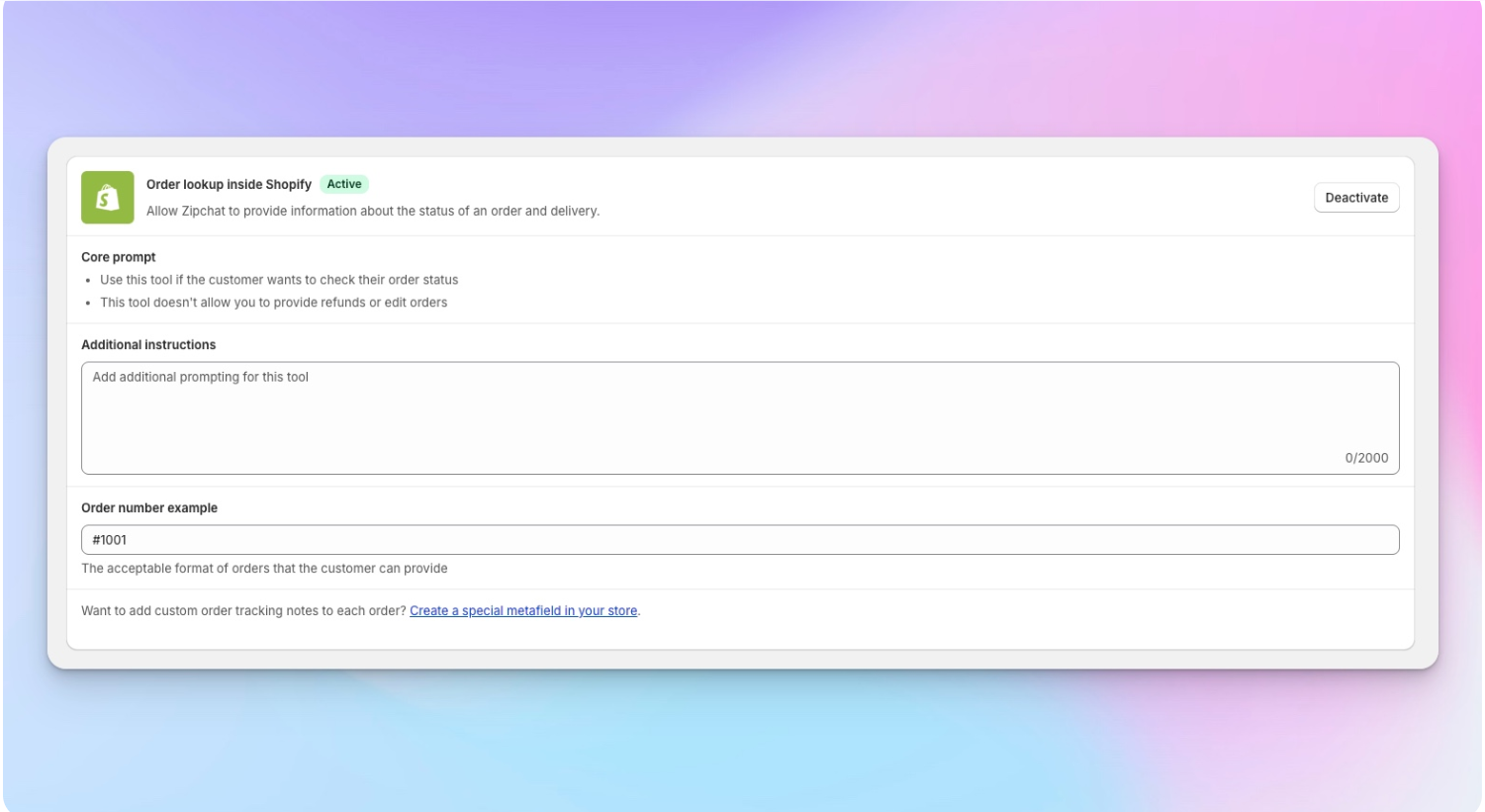
You can also give the order lookup its own instructions, separate from the rest of the AI’s training, and set them per channel. For example, add a line on what to say during peak season, or make WhatsApp replies shorter than email ones.
Can the AI read carrier or fulfillment systems, not just send a tracking link?
Yes, if you connect them. A tracking link answers “where is it?” only when the carrier’s page is up to date. It doesn’t help when the order is still in your warehouse, split across two shipments, or stuck at customs.
On Zipchat, Custom Tools let the AI call your carrier, 3PL, or warehouse system during a conversation. You write plain-language instructions for when to use the tool and what to do with the result. Your API key is stored as an encrypted variable and never shown to the shopper.
Setup lives under AI Training, then Custom Tools. You name the tool (say, “Shipment Tracker”), add the API request, and choose which channels it runs on.
The instruction itself can be one line: “When a customer gives an order number, call our shipping API and return the tracking status and estimated delivery date.”
What that adds in practice:
- Pre-shipment status from the 3PL. “Picked and packed, handing to the carrier this afternoon” beats “unfulfilled.”
- Carrier exception codes in plain words. “Address issue: the carrier needs a door code,” instead of a status like “Exception 07.”
- Split shipments. Which items are left, which are coming separately, and when.
- Backorders. If an item is waiting on stock, the AI says so, with the restock date from your system.
A Custom Tool can only use an API your systems already expose. Someone on your side needs the API key and the docs, plus time to run the instructions through Zipchat’s test chat.
When a parcel is truly lost, the conversation changes. Zipchat’s lost package resolution capability handles that path, from collecting the details to routing the case to your team.
Order tracking automation works on most stores. What changes is how the order data gets connected.
| Shopify | WooCommerce, Magento, BigCommerce, custom stores |
|---|
| How order data connects | Through the Shopify app install | With an API key, through an order lookup endpoint |
| What the shopper provides | Order number and email | Order number and email |
| What the AI can answer | Status, tracking, shipment details, ETA | The same, from whatever your endpoint returns |
| Richer carrier or 3PL status | Add a Custom Tool | Add a Custom Tool |
On Shopify, order lookup reads from your store once the app is installed.
On other platforms, your developer exposes an endpoint that takes an order number and email and returns the order status. You add the endpoint and API key in Zipchat’s settings. Plan for a short piece of developer work here: it isn’t zero engineering, but it’s a one-time job.
WISMO in several languages and on every channel
A German shopper on WhatsApp and a Spanish shopper on Instagram ask the same question. Your team shouldn’t need two translators to answer it.
Zipchat replies in the shopper’s language, across 95+ languages. If your store has localized pages, like /de/ or /es/, you can set up localizations so the AI pulls answers from the matching language version of your shipping and delivery content.
The same order lookup runs on every channel Zipchat connects:
- Website chat widget
- Email
- WhatsApp
- Instagram Direct Messages and Facebook Messenger
This is what fixes the “one shopper, three channels” problem. Whichever channel the customer picks first gets a real answer, so they don’t try the other two. See multilingual customer support and WhatsApp customer support for channel setup.
Merchants with high post-purchase volume have seen the overall effect. Tropicfeel automated 85% of its customer inquiries with Zipchat, and Family Nation automated 80%. Those figures cover all inquiries, not WISMO alone.
Mistakes that keep WISMO high after automation
Launching before order data is connected
A bot without order access can only paste your shipping policy. Shoppers notice in one message, then go straight to email. Connect order lookup first and test it with five real orders in different states.
Hiding the handoff
Some WISMO is a real problem: a wrong address, a damaged box, a parcel marked delivered that isn’t there. If the AI can’t pass those to a person fast, you’ve swapped a ticket for a complaint. Make “talk to a human” easy to reach.
Automating the symptom and ignoring the cause
If WISMO doubled because one carrier is running four days late, the fix is a delay email and a talk with the carrier. Automation answers the questions faster. It won’t make the parcels move.
When WISMO automation falls short
| Condition | What happens | What to do |
|---|
| Order data isn’t connected | The AI can only quote policy | Connect Shopify or your order API before launch |
| Carrier hasn’t scanned the parcel in 48+ hours | The AI repeats a stale status | Add a carrier or 3PL Custom Tool, or tell the AI to escalate stalled orders |
| The shopper has no order number (gift recipient, lost email) | Lookup can’t verify the order | Escalate to a human. The AI collects the shopper’s email and forwards the conversation to your team |
| Parcel marked delivered but not received | Status alone won’t settle it | Use the lost package flow and hand off to your team |
| The customer wants to change or cancel the order | Order lookup answers status; it doesn’t edit orders | See AI agent actions on orders, or route to a person |
The 48-hour threshold is a starting point. Set it to your carriers’ normal scan gaps.
Where WISMO is heading
More parcels, more carriers, patchier tracking. Pitney Bowes counted 23.1 billion US parcels in 2025, with alternative carriers growing fastest, up 127% to 1.8 billion parcels (Pitney Bowes, 2026). Its index names tracking and reliability as that segment’s weak spot.
That means more scan gaps and more WISMO, unless your answers come from more than one carrier page. Expect order-status answers to move from “here’s your link” to “here’s what’s happening, and why.”
Shoppers are also starting to ask AI assistants to check on orders for them. Clean order data behind a verified lookup, the kind described above, is what makes those answers possible.
Frequently asked questions
What does WISMO stand for?
WISMO stands for “where is my order.” Support teams use it for any customer message about an existing order’s status, location, or delivery date. Questions like “has it shipped?” “When will it arrive?” and “Tracking says delivered, but it’s not here” all count as WISMO tickets.
How do you reduce WISMO tickets?
Show a clear delivery date before checkout, then send updates when the order ships, gets delayed, and goes out for delivery. Warn customers about delays before they notice them. For the questions that still come in, an AI agent can answer order status instantly from your store data.
Can a chatbot track orders?
Yes, if it’s connected to your order data. A chatbot with order lookup asks for the order number and email, finds the order, and replies with its status, tracking link, and expected delivery date. Without that connection, a chatbot can only repeat your shipping policy.
At minimum, the AI needs access to your order records and a way to verify the customer, usually the order number plus checkout email. For richer answers, connect your carrier or fulfillment system, so it can explain warehouse status, split shipments, or delivery exceptions too.
Can WISMO automation work on WhatsApp?
Yes. Zipchat runs the same order lookup on WhatsApp as on website chat, email, Instagram, and Messenger. A shopper messages your WhatsApp number, shares their order number and email, and gets the status in their own language. Your team can take over the conversation whenever needed.
Start with your own WISMO number
Before you change anything, count last month’s WISMO contacts and divide by orders shipped. Then check which order status customers were looking at when they asked. That one number tells you whether to fix your emails, your carrier, or your inbox first.
Once the proactive updates are in place, automate the questions that remain. Zipchat’s automate WISMO capability connects to your order data and answers on every channel. For the wider picture, read our guide to ticket deflection, and see AI agent actions on orders for changes beyond status.
Run your volume through the ROI calculator, then start the 7-day free trial and test order lookup on five real orders.
 Website chat Turns browsers into buyers on every page.
  WhatsApp Sell on the app your customers read.
  Instagram Answers every DM in seconds.
  Messenger Turns Facebook ad questions into sales.
  Email Answers every email in the same thread.