
The short version: Shopify product migration apps move titles, SKUs, variants, metafields, media, and order history from another platform or feed into your store, and keep it synced after launch. The right tool depends on whether you need a one-time replatform or continuous automation. The biggest risks are broken URL redirects, SKU collisions, and unmapped metafields. This guide compares five apps and how to migrate without losing SEO or breaking variants.
What is Shopify product migration?
Shopify product migration is the process of transferring a product catalog and its related data into a Shopify store from another source. That source can be a different ecommerce platform, a supplier feed, an ERP, or a spreadsheet. The data includes titles, SKUs, variants, inventory levels, metafields, images, and sometimes customers and historical orders.
Modern migration is not only about moving data. It is about transforming it to match the new store’s structure, then keeping it accurate as the catalog changes. A clean import preserves SEO equity, variant logic, and price integrity. A sloppy one creates 404s, duplicate SKUs, and orphaned variants.
Why manual migration costs more than it looks
Manual CSV imports and copy-paste look free, then quietly drain revenue. The savings are upfront; the costs show up over the following months. Three failure modes account for most of the damage.
- Human error: a mistyped price or a transposed SKU sells stock at the wrong margin or breaks inventory tracking.
- SEO loss: skipping URL redirects sends old, indexed product pages to 404, which erases ranking and the traffic behind it.
- Broken variant logic: sizes, colors, and option sets get disconnected, so customers land on products they cannot buy correctly.
A spreadsheet feels controllable at 200 products. At 5,000 SKUs with metafields and multi-option variants, manual handling stops scaling and starts compounding mistakes.
The five migration risks that break stores
Most failed Shopify migrations trace back to the same technical gaps. Plan for these before you import a single product, not after the 404s appear in Search Console.
Metafields hold the structured data that themes and apps depend on: ingredients, specs, care instructions, fitment, badges, and review aggregates. They rarely map one-to-one across platforms. If the source field names, namespaces, and value types are not mapped to Shopify’s metafield definitions, the data either lands in the wrong field or drops silently. Audit every custom field on the source and define matching Shopify metafields before the import runs.
URL redirects and SEO preservation
Old product and collection URLs are indexed and earning traffic. A new Shopify store uses different URL structures (/products/handle, /collections/handle), so every old path needs a 301 redirect to its new equivalent. Skip this and indexed pages return 404, rankings drop, and the recovery takes months. Export the full URL list from the old site, map each to its Shopify destination, and load the redirects before or at launch.
Variant and SKU collisions
Shopify requires SKUs to behave predictably across variants, and duplicate or conflicting SKUs cause inventory and fulfillment errors. Collisions happen when two source products share a SKU, when option combinations are flattened incorrectly, or when a re-import creates duplicates instead of updating existing variants. Deduplicate SKUs at the source and import with a stable identifier (handle or SKU) as the match key so re-runs update rather than duplicate.
Bulk image import and timeouts
Large catalogs carry thousands of images, and bulk media import is where migrations stall. Images hosted on a slow or rate-limited source can time out, fail silently, or import at the wrong resolution. Hotlinked URLs that later go offline leave broken images across the store. Import media from stable, accessible URLs, verify a sample after each batch, and split very large catalogs into smaller image batches to avoid timeouts.
Historical orders and customers
Customers and past orders are not products, and they need their own migration path. Moving order history preserves lifetime-value reporting and lets returning customers see past purchases. Password migration (where supported) lets customers log in without a reset, which protects the post-launch experience. Decide early whether you need full order history or only open orders, since full history is heavier and slower to import.
1. Products Sync Master
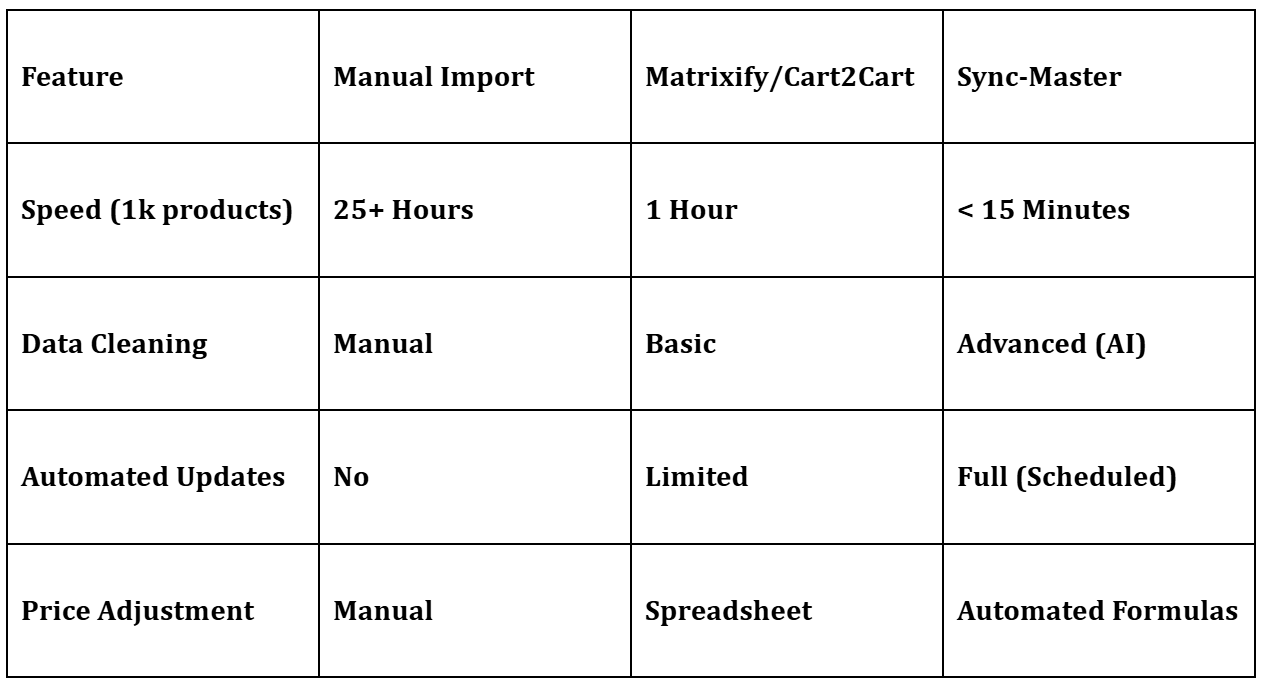
Sync-Master is engineered for high-growth merchants who need more than a one-time import. It works as a live data bridge that connects your store to an external data source and keeps both in sync on a schedule.
Most apps focus on a single transfer. Sync-Master is built for continuous operation, so the same tool that runs the initial migration also keeps inventory, prices, and product data current afterward.
What it does well:
- AI-assisted content generation: built-in ChatGPT integration rewrites descriptions or adjusts titles for SEO during import.
- Advanced data mapping and formulas: apply formulas to adjust prices or convert currencies as data moves.
- Scheduled automations: set recurring syncs to update the store daily without manual work.
- Multi-source support: process XML, Excel, CSV, or Google Sheets.
- Hybrid import and export: move data in both directions between Shopify and external ERP or supplier systems.
- Metafields support: handles Shopify’s metafield structures natively.
Shopify rating: 4.8/5.0. Strongest on technical flexibility and ongoing automation.
2. Matrixify
Matrixify (formerly Excel Export Import) is the reference tool for bulk, file-based data handling. It suits merchants who prefer to manage the whole store structure through Excel or Google Sheets files.
One of its strongest use cases is migrating complex entities like Metaobjects and multi-level collections. It gives granular control over every Shopify field, which makes it the common choice for developers running deep store audits or bulk updates of historical order data.
What it does well:
- Broad entity support: migrate products, orders, customers, collections, and payouts.
- Metaobjects support: handles Shopify’s Metaobject structures natively.
- History preservation: keeps original Product IDs and creation dates.
Shopify rating: 4.9/5.0. Excellent for heavy spreadsheet users and historical-data migrations.
3. LitExtension
LitExtension is known for supporting over 140 source platforms. Its focus is a low-risk migration where no data is lost and SEO rankings stay stable.
Its Smart 301 Redirect service maps old product URLs to the new Shopify structure automatically. That directly addresses the redirect risk above and prevents the 404 spike that often follows a platform move.
What it does well:
- 301 redirect automation: maps old URLs to new Shopify URLs to prevent 404 errors.
- Customer password migration: lets customers log in without resetting passwords.
- SEO URL preservation: keeps the existing URL structure where Shopify allows it.
Shopify rating: 4.8/5.0. Strong on SEO preservation and customer-data continuity.
4. Cart2Cart
Cart2Cart specializes in moving businesses off legacy platforms like Magento, OpenCart, and PrestaShop. It uses a Bridge connection to the old database to read data directly.
It suits merchants who need to move more than products. It can transfer customer passwords, order histories, and discount codes, which keeps the existing customer base in place through the switch.
What it does well:
- Automated data mapping: matches categories from the old site to Shopify.
- Review and coupon migration: moves customer reviews and discount codes.
Shopify rating: 4.2/5.0. A guided wizard approach for full replatforming.
5. Migratify
Migratify is built for speed. It lets users clone product data from global marketplaces into Shopify admin with minimal configuration.
It lacks the formula engine of Sync-Master, but it makes up for it with one-click imports from sites like Amazon, Etsy, and AliExpress. It suits drop-shippers and niche curators who need to launch products fast.
What it does well:
- Instant URL import: paste a product link from Amazon or AliExpress to import it.
- Visual editor: preview and edit product variants before they go live.
- Batch scraping: import entire marketplace categories at once.
Shopify rating: 4.5/5.0. Best for fast product sourcing rather than structured migration.
Comparison: which app fits which job
The five apps solve different problems. Match the tool to the job rather than picking on rating alone.
| App | Best for | Redirects/SEO | Metafields | Ongoing sync | Orders/customers | Rating |
|---|
| Sync Master | Continuous automation + AI content | Via field mapping | Native | Yes (scheduled) | Partial | 4.8 |
| Matrixify | Bulk file-based + historical data | Manual via export | Native (+ Metaobjects) | No (manual runs) | Yes (full) | 4.9 |
| LitExtension | Platform-to-Shopify with SEO intact | Smart 301 automation | Yes | No (one-time) | Yes (+ passwords) | 4.8 |
| Cart2Cart | Legacy replatform (Magento, etc.) | Yes | Partial | No (one-time) | Yes (+ passwords) | 4.2 |
| Migratify | Fast marketplace sourcing | No | Limited | No | No | 4.5 |
How to choose the right migration app
Pick based on the job, not the rating. Use the decision points below to narrow the field in a few minutes.
- One-time replatform from Magento, WooCommerce, or BigCommerce, and SEO matters: LitExtension or Cart2Cart for automated redirects and customer-data continuity.
- Ongoing sync from a supplier feed or ERP, with daily updates and price formulas: Sync-Master for scheduled automation and data transformation.
- Bulk edits, Metaobjects, or historical order migration through spreadsheets: Matrixify for granular field control.
- Fast sourcing from marketplaces for dropshipping: Migratify for one-click imports.
If you need both an initial migration and continued automation, a continuous-sync tool removes the second project. A one-time importer leaves you back at manual updates the week after launch.
When a migration app is not enough
A migration app moves and syncs data. It does not handle the support spike that hits during and after a replatform, when URLs change, accounts behave differently, and customers ask where their order or product went.
Two situations expose the gap. First, the launch window, when 301s, login changes, and reindexing generate a wave of “where is my page / order / account” questions. Second, ongoing operations, when shoppers ask product and data questions that live in metafields and specs the migration moved but no one is around to read back at 2 a.m.
This is where a catalog-aware AI agent earns its place. After migration, Zipchat connects to your Shopify catalog and answers product and data questions from the same fields you migrated: specs, variants, availability, sizing, and care details. It does not run the migration or fix redirects. It absorbs the support load of a store in transition, so a smaller team can keep answering while the catalog settles.
Zipchat runs across website chat, WhatsApp, Instagram, Messenger, and email, supports any language, and resolves over 97% of tickets with under 3% human escalation. Plans start from $64/month, billed annually, with a 7-day trial and a 30-day money-back guarantee. The strategic point is leverage: an agentic support layer lets a lean team handle a migrated, growing catalog without adding headcount for every traffic spike.
Where Shopify migration is heading in 2026
Migration is shifting from one-time projects to continuous data operations. Three changes are driving it.
AI-assisted transformation is becoming standard, so description rewriting and field normalization happen during import rather than as a manual cleanup afterward. Structured data is moving to the center, because metafields and clean product records now feed AI shopping assistants and AI search, not only the storefront theme. And post-migration support is being automated, since the same catalog data that powers product pages can power a conversational agent that answers shoppers directly.
The practical takeaway: treat migration as the start of an ongoing data pipeline, not a finish line. Pick tools that keep syncing and keep your structured data clean enough for both search engines and AI assistants to read.
Frequently asked questions
Can I automate daily stock updates from my supplier?
Yes. With Sync-Master’s automated tasks, you can set the app to fetch a supplier feed on a schedule, hourly or daily, and update inventory levels and prices automatically. This keeps stock accurate without manual exports and is the main reason high-volume stores choose a continuous-sync tool over a one-time importer.
How do I preserve SEO rankings when migrating to Shopify?
Map every old URL to its new Shopify URL and load 301 redirects before or at launch. Indexed product and collection pages that are not redirected return 404, which drops rankings and traffic. Tools like LitExtension automate this with a Smart 301 service; otherwise export the old URL list and import redirects manually in Shopify.
What happens to my variants and SKUs during migration?
Variants and SKUs transfer if you import with a stable match key (handle or SKU) so re-runs update existing products instead of duplicating them. Collisions occur when two source products share a SKU or option combinations flatten incorrectly. Deduplicate SKUs at the source first, then verify variant option sets after the import on a sample of products.
Yes, all five support metafields, though Sync-Master and Matrixify offer the most control for mapping custom fields and Metaobjects. Map source field names, namespaces, and value types to defined Shopify metafields before importing. Unmapped fields either land in the wrong place or drop silently, which breaks themes and apps that read structured product data.
Can I migrate historical orders and customers, not just products?
Yes. Matrixify, LitExtension, and Cart2Cart move customers and order history, and LitExtension and Cart2Cart can migrate passwords so customers log in without a reset. Decide early whether you need full order history or only open orders, since full history is heavier and slower. Migratify focuses on product sourcing and does not handle customers or orders.
Can AI answer customer questions after a migration?
Yes. A catalog-aware AI agent like Zipchat connects to your migrated Shopify catalog and answers product, spec, and availability questions across chat, WhatsApp, Instagram, Messenger, and email. It does not perform the migration, but it absorbs the support spike a replatform creates and keeps answering shoppers 24/7 while the catalog and redirects settle.
Read more from Sync-Master at Sync-Master.