TL;DR
A funnel runs itself when every repeatable action has a clear trigger, a stop condition, and a metric. Keep pricing, offers, and merchandising subject to a human decision. Build the rest of the funnel stage by stage, measure the leaks at each stage, and automate only after you have confirmed the problem by hand.
An ecommerce sales funnel that runs itself is not a funnel without people. It is a funnel in which every repeatable action fires from an event instead of someone remembering to do it.
An action is ready to automate only when three things are true:
Automatable = repeatable action + observable trigger + measurable outcome
If you cannot name the trigger and the stop condition, do not automate it yet.
The four stages
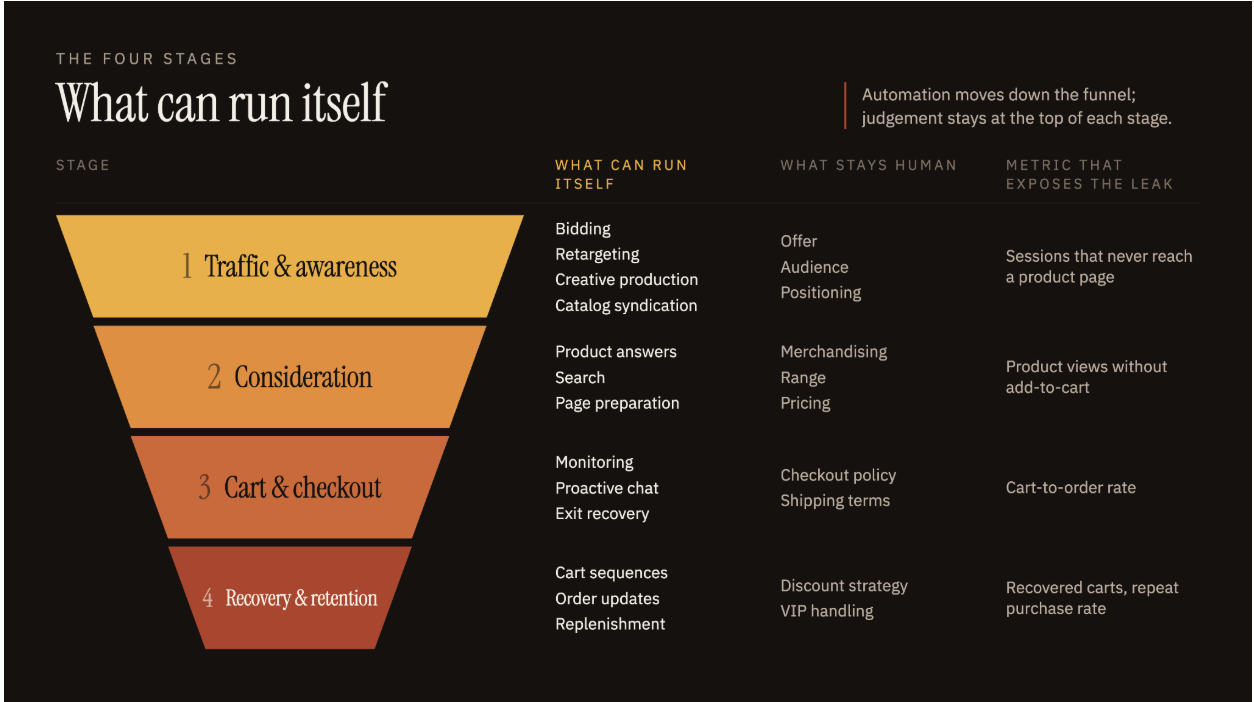
| Stage | What can run itself | What stays human | Metric that exposes the leak |
|---|
| 1. Traffic & awareness | Bidding, retargeting, creative production, catalog syndication | Offer, audience, positioning | Sessions that never reach a product page |
| 2. Consideration | Product answers, search, page preparation | Merchandising, range, pricing | Product views without add-to-cart |
| 3. Cart & checkout | Monitoring, proactive chat, exit recovery | Checkout policy, shipping terms | Cart-to-order rate |
| 4. Recovery & retention | Cart sequences, order updates, replenishment | Discount strategy, VIP handling | Recovered carts, repeat purchase rate |
Measure each stage separately:
Stage conversion rate = sessions that reach the next stage ÷ sessions that entered the stage × 100
Stage 1: Build acquisition that feeds itself
Two parts of the top of the funnel run without daily input. One is the creative supply chain behind your ads. The other is how AI assistants read your catalog.
Ad platforms already handle bidding, placement, audience delivery, and retargeting once your conversion events are configured. The manual work happens before you get to this point; finding angles and producing enough creatives to test them.
Build that loop with three elements: a library of competitor ads worth studying, a record of which formats have run longest, and a repeatable way to turn a winning angle into new scripts.
Judge any creative tool by one number: testable variants shipped per week against your previous rate. If you currently run fewer than four creative tests a month, the real constraint is budget or offer; no production tool will move that number.
Getting the right people to the site is only half the job. The next step is making sure your products can actually be found.
Make your catalog readable by AI assistants
On Shopify, eligible products are listed in Shopify Catalog by default, and you choose which AI partners receive the feed. Listing is automatic. Recommendation is not.
An assistant matches a shopper’s request against structured fields - title, description, product type, variant options, attributes, availability, and price. Empty or vague fields remove you from the answer before ranking begins.
GEO and AEO tools can automate the rewrite so descriptions align with how LLMs actually search a niche.
A practical tip: Test your current organic position in LLMs. Write the 20 prompts a shopper would use to find your category, run them in ChatGPT and Gemini, and record which brands get named.
Stage 2: Build a consideration stage that answers without you
Once someone is on the site, two things stop the decision: the page cannot answer their specific question, and moving between pages costs time.
Let an assistant handle the questions the product page cannot
One shopper wants to know whether the jacket is waterproof. Another is choosing between two sizes. A third wants a recommendation for a specific trip.
No product page holds every version of those questions. An AI shopping assistant answers them from the product on screen and the question asked.
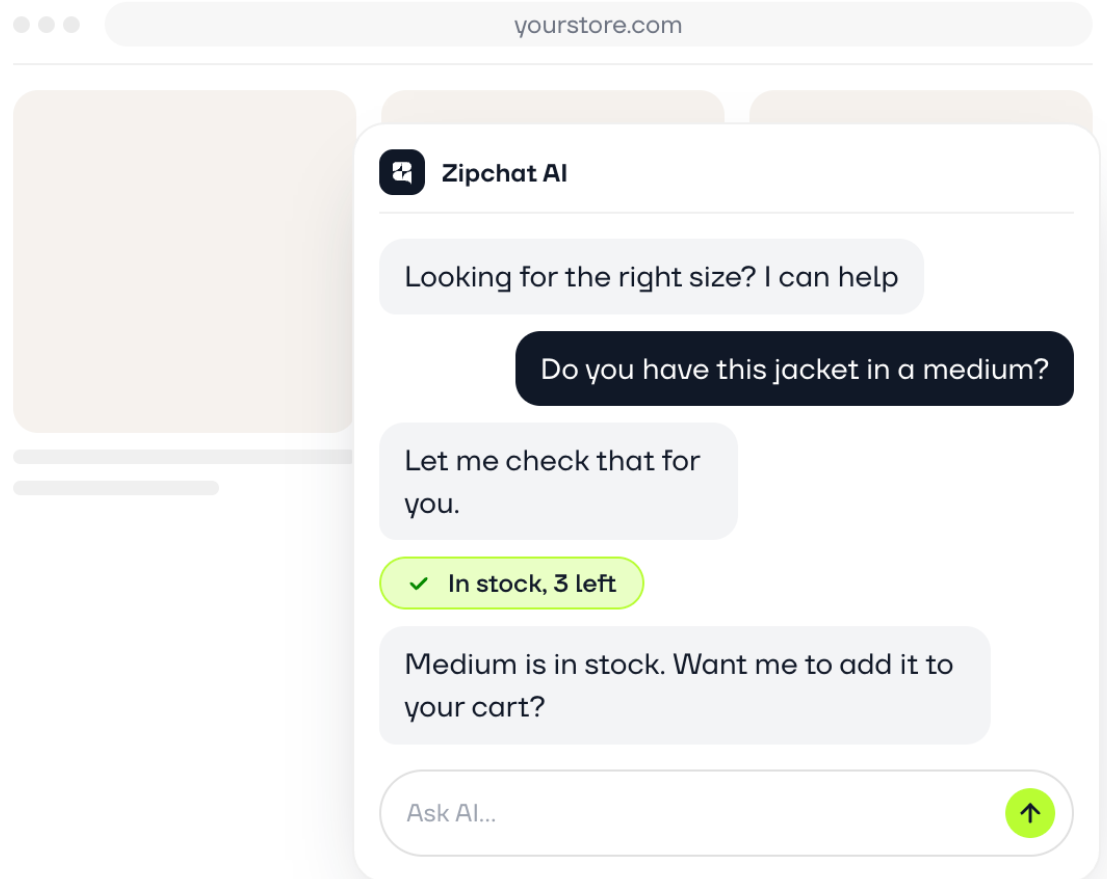
It also works in reverse, when the shopper knows the requirement but not the product. Zipchat reports that its agentic search produces 85% fewer no-results pages, with 89% of searches ending in at least one product click.
Whatever you connect, decide its inputs before launch: live inventory, variant data, shipping times, and the returns policy. An assistant that recommends an out-of-stock variant creates a support ticket instead of an order.
Answering the shopper’s questions removes one source of friction. Making it easier to move through the store removes another.
Remove the wait between product and category pages
Consideration runs across category pages, product pages, comparisons, and the cart. Every transition adds a load, and every load is an exit point.
Faster loads reduce that exit rate directly. When marketplace Agrofy improved their site speed by 70%, that cut load abandonment from 3.8% to 0.9%, a 76% reduction.
A practical tip: Google’s threshold for that metric is a largest contentful paint under 2.5 seconds for 75% of page loads. Measure yours per template, because a category page and a product page rarely score the same.
Performance agents like Navigation AI by Uxify read the session in progress and preload the next likely page before the click. On UK retailer EcigOne, 31.57% of shoppers in Navigation AI sessions added a product to cart, compared with 21% without it (Uxify, May 2026). The catalog, prices, and creative stayed the same across both groups. Only the speed of moving through the store changed.
Stage 3: Build a checkout that protects itself
At the cart, the shopper has already decided they want the product. Three failure points may still cost you the order.
The checkout experience has to work
Checkout is the worst place for technical friction.
Buttons should respond when they are clicked. Form fields should work. Shipping options, payment methods, inventory, discounts, and order totals should update without making the shopper wonder whether something broke.
This is where automated experience monitoring and performance agents can help. A stuck interaction or slow checkout step is not something an ecommerce team should have to discover in a weekly report after orders have already been lost.
The objective is straightforward: once someone has decided to buy, nothing technical should make that decision harder to complete.
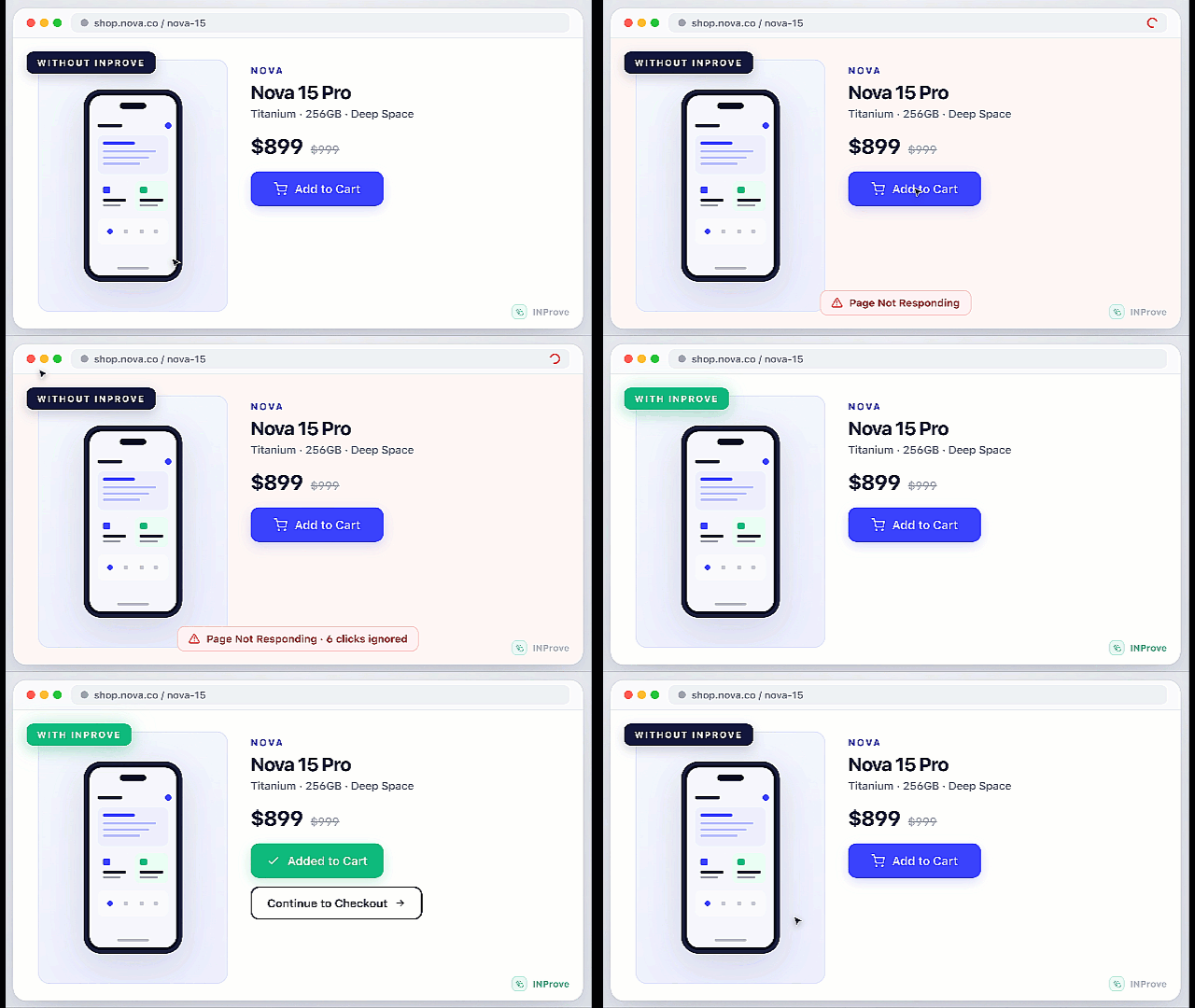
Not every checkout problem is technical though, or can be a performance tweak. Sometimes the page works perfectly, but the shopper still needs one last answer before they buy.
Answer the last question before the tab closes
“When should I expect my order”
“What’s the return policy”
“What if I get my size wrong”
All these are questions that come to the shopper’s mind at checkout. And it’s your job to make sure they get them answered on the spot, and not when the session ends.
Zipchat fires proactive chat when exit intent is detected, before the shopper leaves, and answers using the products already in the cart. The trigger is behavioral, so the assistant only interrupts sessions that were about to end anyway.
Stage 4: Build recovery and retention on order events
Recovery and retention are the easiest stages to build. Both run on events your platform already emits: a started checkout, a created order, a fulfillment, a delivery.
Trigger recovery in minutes and stop it on the order
Purchase intent decays inside the hour. Zipchat recommends sending the first recovery email within one hour of abandonment, followed by WhatsApp recovery messages 30 to 45 minutes after.
But speed only helps if the sequence knows when to stop. Cancel any remaining messages on the orders/create event, so customers who complete their purchase don’t keep receiving recovery prompts.
Then be selective about where you use an incentive. Segment by cart value before offering a discount. A recovered cart that only converts because of a 20% code can easily cost more than it returns.
Once the order comes through, the job changes from recovering the sale to keeping the customer informed.
Turn order status into the post-purchase sequence
Confirmation, fulfillment, shipping, delivery, and returns updates can all be tied directly to order status. That keeps customers informed automatically and cuts down on “where is my order?” queries without adding work for the team.
That same post-purchase window is also a good opportunity to learn more about the customer. One question on the thank-you page, asking how the customer found you, produces attribution answers no ad platform reports.
Start with a single question and a free form embed. Move to a dedicated tool such as Fairing when you need response targeting by product or country, and answers joined to order value.
When an automated ecommerce sales funnel breaks
Automation works best when the fundamentals are already sound. It can help surface weak product-market fit, uncompetitive pricing, poor unit economics, or an unclear offer faster, but it cannot solve those problems for you.
It is also only as reliable as the data feeding it. Missing events, duplicate customer records, or conflicting attribution rules can send the wrong messages, trigger the wrong actions, and make reporting difficult to trust.
Volume matters too. For smaller stores, relying on percentages can be misleading because a handful of orders can shift conversion rates significantly. In those cases, prioritize looking at absolute numbers before making a change.
And last but not least - the fact that you can automate a big portion of the funnel doesn’t mean you should automate every interaction. High-value complaints, unusual returns, or situations that need judgment and context are usually better handled by a person.
How to get started with automating your sales funnel
That is why the goal should not be to automate as much as possible. It should be to automate the right problem at the right point in the funnel.
| What you see | Likely problem | What to build |
|---|
| Visitors arrive but rarely view products | Acquisition or landing-page mismatch | Audience and landing-page segmentation |
| Product views are high but carts are low | Unanswered questions or weak discovery | AI shopping assistance and product search |
| Shoppers browse several pages then exit | Navigation or performance friction | Predictive page loading |
| Shoppers reach the cart but leave the site | Late-funnel hesitation | On-site cart recovery |
| Abandoned carts get no follow-up | Lost high-intent traffic | Abandoned-cart sequence with a stop condition |
| Customers buy once and do not return | Weak post-purchase lifecycle | Replenishment and lifecycle flows |
Then run the build in this order:
- Measure stage conversion rates across all four stages for 30 days.
- Pick the stage with the largest gap and name one problem inside it.
- Run the manual version of the fix once, by hand, to confirm the problem is what you think it is.
- Build one automation for it, define its trigger and stop condition, and leave the rest manual.
- Re-measure the same stage after 30 days before adding anything else.
Step three is the one teams skip, and it is the cheapest. Software bought against a guessed problem still runs, which is what makes the mistake hard to notice.
A funnel that runs itself is built one trigger at a time. The finished state is not a fully automated store. It is a store where the repeatable work fires on its own, and your attention goes to the decisions that change the numbers.
FAQ
What is an automated ecommerce sales funnel?
It is a funnel where repeatable actions fire from customer or system events instead of manual work. Retargeting, product answers, cart recovery, order updates, and replenishment reminders all run from triggers, while pricing and merchandising stay manual.
Which funnel stage should I automate first?
Start with the stage that has a measurable drop-off and a clear action that could remove it. Avoid vague goals such as “improve conversion,” because they give you no way to tell whether the build worked.
Can an ecommerce sales funnel run fully on autopilot?
No. Execution can be heavily automated, but pricing, merchandising, creative direction, margin calls, and unusual customer cases need human judgment. Automation handles the repeatable actions between those decisions.
Fewer than most vendor lists suggest. A commerce platform, analytics, conversational AI and agentic CRO, a customer messaging system, and a way to pass events between them cover the majority of the build. Add specialized systems only when a stage shows a leak the existing stack cannot close.
How long before an automated funnel shows results?
On-site builds such as chat, search, and page preparation show stage-level movement within a few weeks of normal traffic. Lifecycle and retention flows need at least one purchase cycle, which depends on how often customers reorder.