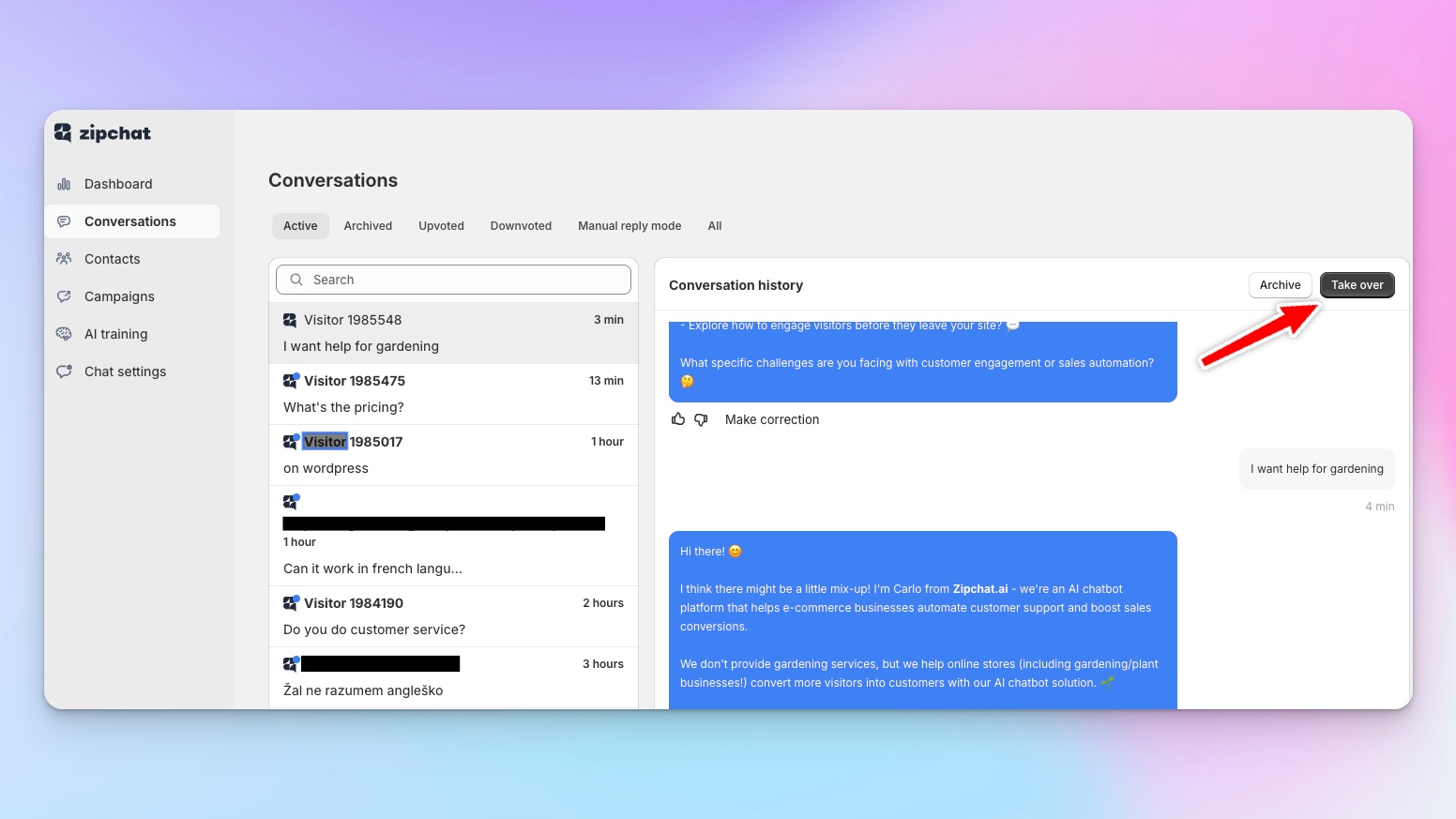
Human Chat Takeover: Seamless AI-to-Agent Handoff
Seamlessly transfer conversations from AI to human agents when needed, with live chat takeover or ticketing system integration.
Overview
AI can't handle everything. Sometimes customers have edge cases outside your knowledge base. Sometimes they need exceptions to policy. Sometimes they're just frustrated and want a human. When these moments happen, you need seamless escalation that doesn't make customers repeat themselves or wait in limbo.
Zipchat's Human Chat Takeover lets you move from AI to human support instantly across any channel. When the AI recognizes it can't help, needs authorization for something, or the customer explicitly requests a person, it escalates automatically. You control when this happens through simple instructions in your prompt settings.
You get two handoff options. For non-urgent issues, the AI creates a ticket in your existing support system for your team to handle when available. For immediate needs, agents can take over the live conversation directly in Zipchat. The agent sees the full conversation history, picks up exactly where the AI left off, and continues naturally. Customers don't restart their explanation or switch platforms—the conversation just continues with a human.
The agent interface works like live chat. Your team keeps the conversation tab open in their browser. When customers reply, browser notifications and sound alerts notify agents immediately. They can handle multiple conversations simultaneously, with full context from what the AI already discussed. Once resolved, they can hand back to AI or close the conversation.
Agent efficiency improves by 40-50% because they only handle what requires human expertise, with full context already gathered by AI. For brands that want AI efficiency without sacrificing human touch when it matters, this ability provides the perfect balance.

Overview
Problem
Solution
Scenario description
Refund Exception Request
A customer messages about a product purchased 45 days ago: "I need to return this but I'm past your 30-day window. Can you make an exception? I was traveling and couldn't return it sooner."
The AI recognizes this requires authorization beyond standard policy: "I understand your situation. Since this is outside our standard return window, I'm going to connect you with our customer service team who can review your case and see what we can do. They'll be able to help you within the next 2 hours."
A ticket is created with full context: customer history, purchase details, and the specific request. Two hours later, a support agent reviews the case, sees the customer is a loyal repeat buyer, and approves the exception.
The AI correctly identified what it couldn't authorize, escalated with context, and the customer got a resolution without repeating their story. The agent made an informed decision based on customer history the AI had already surfaced.
Live Technical Support Need
A customer is trying to set up a smart home device and messages: "I followed all the steps but it's not connecting to my WiFi. I'm getting error code E47."
The AI checks the knowledge base but this error code isn't documented: "I don't have information about error code E47 in my system. Let me connect you with a technical specialist who can help troubleshoot this right now. One moment."
A notification pops up on the tech support agent's screen. She clicks into the conversation, sees the full history including the error code, and takes over: "Hi! I'm Sarah from technical support. Error E47 usually means your router is blocking the device. Are you using a 2.4GHz or 5GHz network?"
The agent walks the customer through the fix in real-time, resolves the issue in 5 minutes, and marks the conversation complete.
The customer got immediate expert help without switching channels or repeating information. The agent had full context and could provide hands-on troubleshooting the AI couldn't handle.
Setup guide
- Navigate to AI Training → Prompt & Tools → Additional Instructions
- Define escalation triggers: knowledge gaps, policy excptions, customer frustration signals, explicit human requests, complex technical issues
- Choose escalation method: automatic ticketing in your support system, manual live chat takeover in Zipchat, or both depending on urgency
- Configure ticket integration with your existing support platform (Zendesk, Gorgias, Freshdesk, etc.) if using ticketing
- Set up agent access to Zipchat conversations dashboard for live takeover capability
- Train agents to leave browser tab open for instant notifications when customers reply
Ability statistics
Technical table
FAQs
When does the AI decide to escalate to a human?
You control escalation triggers through your prompt instructions. Common triggers include: customer explicitly asks for a human, AI doesn't have information in knowledge base, customer is frustrated or angry, request requires manager approval (refunds, exceptions, discounts beyond AI authority), complex technical troubleshooting, or sensitive account issues. The AI recognizes these scenarios and escalates automatically based on your rules.
Do customers have to repeat themselves when transferred to a human?
No. The human agent sees the complete conversation history before they take over, including everything the customer said, all AI responses, and any context gathered. When the agent joins, they pick up seamlessly: "I see you've been asking about the refund for order #4782. Let me help you with that." The customer continues the conversation naturally without restarting.
Can agents take over conversations in real-time or only through tickets?
Both. For urgent issues, agents can take over live in the Zipchat dashboard and continue the conversation immediately in real-time. For non-urgent issues, the AI creates a ticket in your support system for agents to handle when available. You configure which scenarios need immediate takeover versus asynchronous ticket handling based on urgency and agent availability.
Does this work across all channels like WhatsApp and email?
Yes. Human takeover works on chat bubble, WhatsApp, Instagram DMs, Messenger, and email. The experience is consistent: AI escalates when needed, agents see full context, and they handle the conversation in the same channel the customer initiated. An agent can take over a WhatsApp conversation directly in WhatsApp, an Instagram DM stays in Instagram—no channel switching required.
How does this impact agent efficiency and workload?
Agent efficiency improves dramatically because they only handle the 5-10% of conversations requiring human judgment. The AI handles 90%+ autonomously, qualifying customers, gathering context, and attempting resolution before escalation. When agents do get involved, they have full context already gathered, eliminating repetitive information collection. Brands report 40-50% improvement in agent efficiency because agents focus on complex problem-solving rather than routine questions.

Try Zipchat in Action!
Enter your store URL to see how Zipchat would behave.