Try Zipchat in Action!
Enter your store URL to see how Zipchat would behave.



“Opportunities are like buses, there’s always another one coming,” Richard Branson.
As a business owner, you too can take advantage of the abundant opportunities in the online marketplace. Reports have shown that by the end of 2026, e-commerce sales are expected to hit $6.9 trillion (WiserReview). While starting an online store can feel overwhelming at first, with many owners and managers finding the process very technical, expensive, or only reserved for experienced sellers, the reality is much simpler.
In today’s digital landscape, launching an online business has been made much easier, even with limited experience or budget. You can now use intuitive store builder tools like Shopify, Wix, and others to sell products, connect with customers, and grow sustainable brands. This makes it easier to run your business from anywhere, reach customers worldwide, and turn your hobby into a money-making venture.
If you are still feeling overwhelmed about starting an online store, relax, we’ve got your back. You’ll learn how to start an online store step by step in this guide. From setting your store up for long-term growth, to choosing what to sell, to supporting customers after launch. You'll also learn how support tools like Zipchat make it easier to proactively engage with your customers when you start running the store.
Key Takeaways
- Starting an online store involves multiple steps, from choosing what to sell to setting up payments, shipping, and customer support.
- Selecting the right ecommerce platform is crucial for managing your store efficiently and scaling over time.
- Creating clear product pages and a user-friendly storefront helps attract and convert online shoppers.
- Tools like Zipchat can provide 24/7 support, helping answer customer questions and reduce friction in the buying process.
- Early store performance may vary, and refining your setup marketing, product listings, and customer experience is a normal part of growth.
- Marketing and attracting customers after launch are essential for turning your store into a sustainable business.
What Starting an Online Store Really Involves
Starting an online store may seem overwhelming at first, but it’s important to know that most successful ecommerce stores begin with a basic setup and improve gradually over time. Launching an online store involves a series of important tasks and decisions that lay the foundation for long-term growth.
Founders first need to decide what products or services they will offer and define a target audience. Next comes choosing an ecommerce platform that fits their business needs, whether it’s Shopify, Wix, BigCommerce, or another option. Once the platform is selected, key operational elements like payments, shipping, taxes, and store policies must be configured.
Beyond the technical setup, creating compelling product pages and a clean, intuitive storefront is essential for attracting online sales and converting shoppers. Additionally, planning how to provide customer support tools like Zipchat can make this much easier. This sets the stage for a smoother buying experience and higher customer satisfaction.
In short, starting an ecommerce business is a combination of strategy, technical setup, and customer-focused decisions. While the first launch doesn’t need to be perfect, building a solid foundation ensures you can refine and scale your store over time.
How To Start an Online Store Step-By-Step
Launching an online store may feel like a big task, but breaking it down into clear steps makes the process manageable. Each step builds on the previous one, helping you create a functional, customer-friendly store while setting yourself up for long-term growth. Below is a step-by-step guide to starting your online store:
1. Decide What You’re Going To Sell on Your Ecommerce Website
What it entails: Choosing your product or service is the foundation of your business. This could be physical items, digital products, or even subscription services. Consider factors like demand, profit margins, and your passion or expertise.
Why it matters: Your product determines your brand identity, target audience, and marketing strategy. A clear product focus makes store setup, inventory planning, and promotion easier.
Common mistakes to avoid: Avoid selling products online based solely on trends or high profit potential without understanding your audience or logistics. Selling too many unrelated items at first can dilute your brand.
2. Define Your Target Audience
What it entails: Identify who your ideal customers are. Use the available customer data and consider the age, location, interests, shopping habits, and challenges your product solves.
Why it matters: Knowing your audience and target market helps you tailor messaging, product pages, marketing campaigns, and customer support. It ensures your efforts reach the people most likely to buy.
Common mistakes to avoid: Don’t assume everyone is your customer. A broad, undefined audience makes marketing and engagement less effective.
3. Choose an Ecommerce Platform
What it entails: Select the software that will host your online store. Popular options include Shopify, Wix, Magento, and BigCommerce. Platforms differ in pricing, ease of use, customization, and integrations.
Why it matters: Your ecommerce platform impacts your store’s design, functionality, payment setup, and scalability. Choosing the right one from the start reduces future headaches.
Common mistakes to avoid: Don’t pick a platform based solely on low cost. Consider long-term growth, available tools, and integrations like payment gateways or AI chat support.

Learn how to choose the right ecommerce platform.
4. Set Up Your Ecommerce Site and Brand Values
What it entails: Customize your website theme, layout, and navigation. Add branding elements like your logo, color scheme, and banners to reflect your brand identity. A clean, intuitive storefront design improves user experience, builds trust, and encourages visitors to explore and make purchases.
Why it matters: It matters because recent reports indicate that nearly 80% of consumers globally make an effort to purchase from brands with aligned values (WiserReview).
Common mistakes to avoid: Avoid cluttered layouts, hard-to-read text, or inconsistent branding. Poor navigation can frustrate shoppers and reduce conversions.
5. Create Product Pages
What it entails: Upload product images, write engaging product descriptions, set pricing, and organize items into categories. High-quality visuals and clear descriptions are crucial.
Why it matters: Well-crafted product pages help shoppers make informed decisions, improving conversion rates and reducing returns.
Common mistakes to avoid: Don’t use stock images only, write vague descriptions, or neglect key details like size, color, or materials.
6. Configure Shipping, Taxes, and How To Accept Payments
What it entails: Set up payment gateway, shipping rules, and tax configurations. Decide which payment methods to accept and how to handle shipping costs.
Why it matters: Smooth checkout processes of the different sales channels and transparent shipping policies prevent cart abandonment and build customer trust. This is because about $260 billion worth of global lost orders are recoverable solely through a better checkout flow & design (Baymard).
Common mistakes to avoid: Avoid complicated checkout flows, hidden fees, or neglecting to verify tax settings for your region.
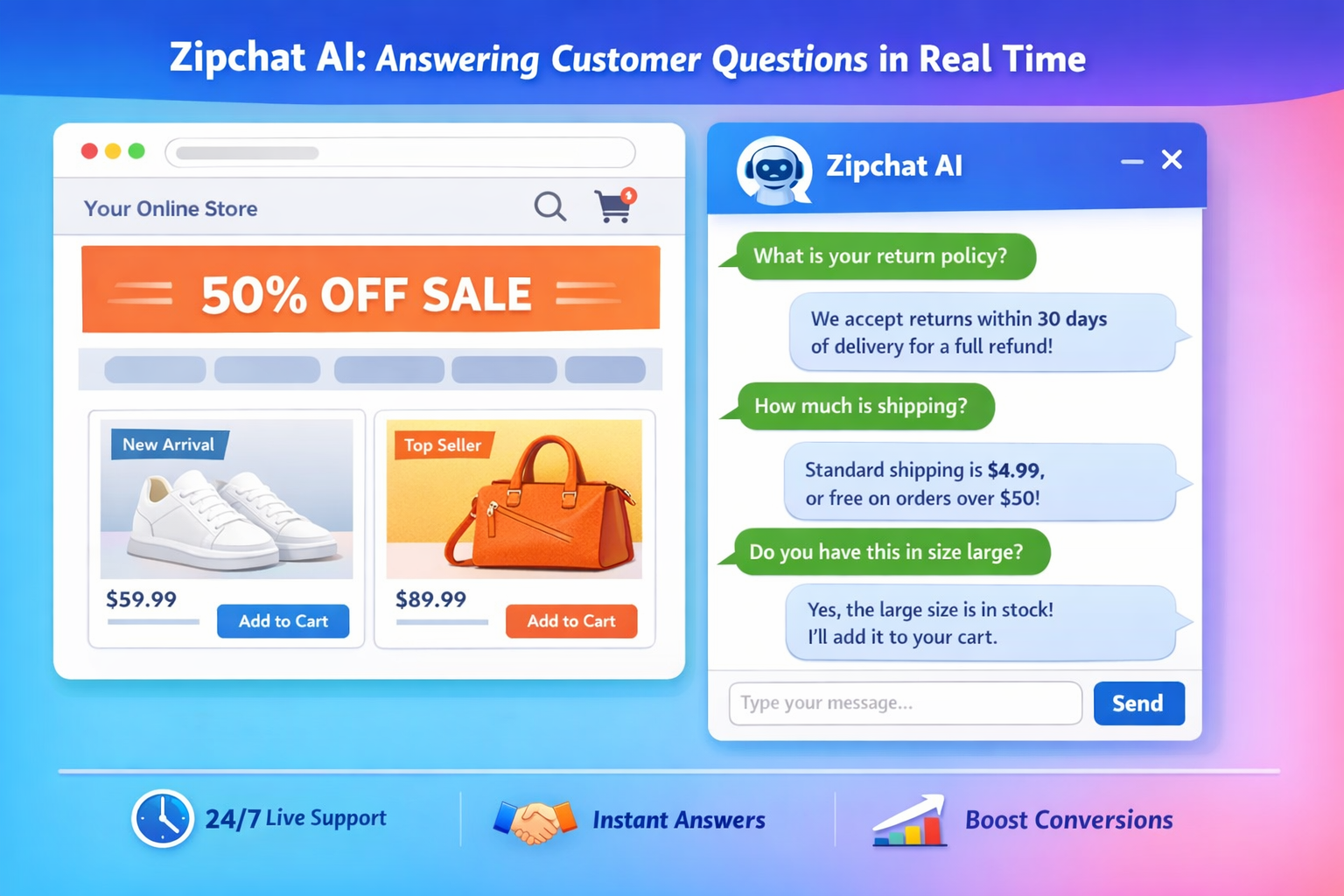
7. Set Up Customer Support and Communication Channels
What it entails: Implement channels for customer feedback and where to ask questions and get help, such as email, live chat, and AI-powered chatbots like Zipchat.
Why it matters: Quick, clear customer support reduces friction during the buyer journey, improves conversions, and encourages repeat purchases.
Common mistakes to avoid: Don’t ignore customer inquiries or rely solely on email. Slow responses can lead to lost sales and negative reviews.
8. Launch Your Store
What it entails: Make your store live to the public, test all features, and ensure products, payments, and shipping work correctly.
Why it matters: A smooth launch creates a strong first impression, encourages early sales, and builds credibility.
Common mistakes to avoid: Avoid launching without testing links, checkout flows, or mobile responsiveness.
9. Build Marketing Campaigns and Attract Customers to Your Store
What it entails: Promote your store with an effective ecommerce marketing strategy through social media marketing, email campaigns, paid advertising, and other content marketing tools. Track results and optimize campaigns.
Why it matters: Marketing drives more traffic, attracts your ideal audience, and increases sales. Consistent promotion is essential for growth.
Common mistakes to avoid: Don’t rely on a single channel or ignore analytics. Without monitoring results, marketing efforts may be wasted.
What To Expect in the First Stages of Running an Online Store
Launching your online store is just the beginning. In the first weeks and months, it’s normal to experience slow sales and a learning curve as you refine your processes. Most stores do not see immediate results, and early performance is more about gathering insights than generating revenue.
During this phase, you should closely monitor and optimize your store. Pay attention to your product pages, checkout experience, messaging, and promotional efforts. Customer interactions, questions, feedback, or abandoned carts often reveal gaps in your product descriptions, shipping policies, pricing, or support processes. For example, shoppers may ask the same questions repeatedly, highlighting areas where clarity is needed.
Using tools like Zipchat can help you manage these early interactions efficiently. By providing 24/7 support, answering questions instantly, and guiding customers through the buying journey, Zipchat allows you to identify and fix friction points quickly, improving the overall shopping experience without adding extra workload.
Remember, adjustments and improvements after launch are normal and expected. Successful online stores evolve over time, refining product pages, optimizing marketing strategies, and improving the checkout process based on real customer behavior. Patience, observation, and proactive optimization are key to building a store that grows sustainably.
Benefits of Opening an Online Store
Opening an online store offers several advantages for first-time entrepreneurs and small business owners. Here are some of the key benefits:
- Lower starting costs compared to physical stores
When you start selling online, you'll require less upfront investment than a brick-and-mortar store. You save on rent, utilities, and in-store staff, allowing more resources to go toward inventory, marketing, and technology. - Ability to run the business from anywhere
Online stores are accessible from anywhere with an internet connection. This flexibility lets you manage your store remotely, whether you’re traveling, working from home, or scaling across multiple locations. - Access to a global customer base
Unlike physical stores limited by geography, selling online allows you to reach customers worldwide. This expands your potential audience, increases revenue opportunities, and allows you to explore niche markets. - Easier to scale and grow
Online stores are easier to scale as demand grows. You can add new products, integrate apps for automation, and expand marketing efforts without the constraints of physical space. Digital tools, like Zipchat, make customer support seamless as your business grows. - Data-driven insights for smarter decisions
Online stores generate valuable data on sales, traffic, and customer behavior. These insights help you optimize marketing, improve product offerings, and refine the overall shopping experience for your customers.
Conclusion
Starting an online store involves several steps and decisions, from deciding what to sell and choosing an ecommerce platform to setting up your storefront, configuring payments and shipping, and providing excellent customer support. Success doesn’t happen overnight; progress comes from continuous learning and improvement after launch. Refining your storefront design, optimizing product pages, adjusting marketing strategies, and improving the overall customer experience are all part of growing a successful online business.
Tools like Zipchat can make this journey smoother by providing 24/7 customer support, answering common questions instantly, and helping guide shoppers throughout the buying journey, reducing friction and supporting conversions. By combining careful planning, ongoing optimization, and the right support tools, first-time store owners can build an online business that grows sustainably over time.
Want to understand Shopify as a platform specifically? Read our guide on how to sell on Shopify.
Online Store FAQ
How to open an online store for beginners?
To open an online store, start by deciding what products you want to sell, identifying your target audience, choosing a user-friendly ecommerce platform, setting up your storefront and product pages, configuring payments and shipping, and providing reliable customer support. Tools like Zipchat can help you assist customers from day one.
How much is it to set up an online store?
The cost depends on the platform, features, and apps you choose. Many ecommerce platforms offer plans starting from a low monthly subscription, plus optional costs for apps, themes, and payment processing. For beginners, it’s possible to launch a basic store with minimal upfront investment.
What are some common mistakes to avoid when opening an online store?
Common mistakes include launching without a clear product strategy, neglecting customer support, having poorly designed product pages, underestimating marketing needs, and not testing checkout processes. Early adjustments and tools like Zipchat can help prevent these issues.


Try Zipchat for free