Try Zipchat in Action!
Enter your store URL to see how Zipchat would behave.


Escalation Management: Definition, Process, Matrix & Policy (2025)

Escalation management is a structured approach to route unresolved customer issues to the right person with a clear SLA. The support teams classify severity, set owners and timelines, keep customers informed, and review root causes to prevent repeats. In ecommerce, bots escalate to agents when intent, sentiment, or risk thresholds are met.
What is escalation management?
In ecommerce and customer experience (CX), escalation management is the process of systematically routing an unresolved issue - one that frontline agents or AI chatbots can’t fix - to a higher level of expertise or authority.
The goal isn’t just hierarchical escalation, but to ensure it’s handled faster, more transparently, and within a defined service-level agreement (SLA). A strong escalation process can be likened to a problem solving skill that prevents customers from getting stuck in endless loops of “please hold” or “we’ll get back to you soon.”
In support operations, issues are often categorized by escalation levels (L1–L3):
- L1 (Frontline): Chatbot or entry-level agent manages FAQs and basic requests.
- L2 (Specialist): Senior agents handle moderate or technical issues.
- L3 (Manager/Expert): Leadership or engineering resolves high-severity or compliance-impacting complex issues.
This hierarchy ensures that every case is resolved at the lowest possible level, with clear triggers for when it should escalate, whether that’s a missed SLA, a customer problem, or a flagged risk.
If your goal is to automate escalation and reduce manual routing, effective escalation management becomes the backbone of your AI workflows, helping teams automate support without losing the human touch.
Why Customer Escalation Management Process Matters: Outcomes & KPIs
When escalation management works well, customers don’t see it; they just experience fast, confident resolution. But when it fails, every gap becomes visible: delayed responses, duplicated customer tickets, angry follow-ups, and public complaints.
In ecommerce, a single support delay can mean a lost cart or a refund request, but effective escalation management directly drives retention, loyalty, and revenue.
Here’s what effective escalation management delivers:
- Faster resolution times: Clear routing and ownership prevent customer tickets from sitting idle.
- Higher CSAT: Customers feel heard when their issue is escalated with context and care.
- Lower Average Handle Time (AHT): Less back-and-forth between agents.
- Reduced escalation rate: Automation and first-contact fixes reduce the number of issues that need senior attention.
- Better First Contact Resolution (FCR): Structured triage prevents unnecessary escalations.
- Improved agent morale: Defined boundaries and matrix ownership eliminate “ping-pong” responsibility.
KPIs to track escalation performance
To know if your escalation policy is working, track key metrics regularly:
- Escalation rate: % of total tickets that move beyond L1.
- First Contact Resolution (FCR): % of issues resolved without escalation.
- Customer Satisfaction (CSAT): Post-resolution survey score.
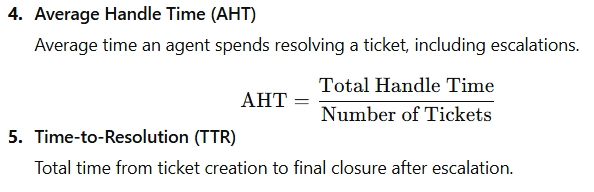
- Average Handle Time (AHT): Time spent per ticket, including escalations.
- Time-to-Resolution (TTR): Total time to close after escalation.
- VIP Response Time: Median response time for high-value customers.
Benchmark tip: Top ecommerce teams keep escalation rates under 10–15%, FCR above 70%, and CSAT consistently above 85%. Your targets may vary based on product complexity and channel mix.
An optimized escalation process transforms support from reactive to predictive, spotting recurring pain points early, training bots to deflect them, and freeing up agents for high-value interactions.
The Escalation Process (6 Steps)
Every organization handles escalations differently, but the most reliable ones follow a repeatable six-step framework. Whether you’re using helpdesk software or AI-assisted routing, a functional escalation process ensures nothing slips through the cracks.
1. Acknowledge & triage
The moment an issue crosses a service threshold (missed SLA, negative sentiment, or repeated failure), acknowledge it immediately. Confirm receipt, set expectations, and log the escalation in your system.
2. Classify severity & impact on customer care
Use a standard scale (S1–S4) to categorize urgency and impact. For instance, S1 could mean “checkout broken sitewide”, while S4 might mean “minor content fix.” This classification drives ownership and SLA timelines.
3. Assign owner & SLA
Route the issue to the correct role or customer support: Tier 2, technical specialist, or manager, with a defined SLA for first response and resolution. Clear accountability prevents “who owns this?” confusion and shortens turnaround time.
4. Communicate Updates to Maintain Best Practices
Keep customers informed throughout throught proactive updates (“We’re escalating your case to a specialist”), build confidence, and reduce duplicate tickets and customers' concerns. Internal communication is just as vital, as agents need context, not just a transfer.
5. Resolve or hand off
The assigned owner investigates, coordinates across departments if needed, and resolves the issue. If it requires higher authority or technical access, it’s re-escalated, but always with context attached (ticket history, chat transcript, and timeline).
6. Document root cause & learnings
Once resolved, record the cause of the escalation and how it was resolved. Feed this data into AI models, FAQs, and agent training to reduce similar issues in the future. Continuous feedback is what turns escalation from a cost center into a learning loop.
Escalation Matrix (Severity × Channel × Owner × SLA)
An escalation matrix defines who handles what and how fast. It’s the backbone of your support governance, ensuring the right people act with the right urgency on the right channels.
Below is a simplified version of a 4×4 ecommerce escalation matrix, showing how severity, communication channels, ownership, and SLAs align:

A strong escalation matrix removes ambiguity; everyone knows what “critical” means, who’s accountable, and when to communicate. It also forms the foundation of your escalation policy, which outlines how escalations are initiated, tracked, and closed.
For a ready-to-use structure, download our escalation policy template and adapt it to your brand’s workflows.
AI Escalation Plan and Management: When a Chatbot Should Hand Off
Even the most advanced AI chatbots recognize their limitations. The goal of AI escalation management isn’t to replace human empathy; it’s to recognize when a support request requires a transition from automation to human expertise.
An effective ecommerce chatbot should trigger an escalation when predefined signals suggest that continuing the automated flow could harm experience, compliance, or trust.
Common AI escalation procedure triggers
- Unknown intent: The bot can’t confidently interpret the customer’s query after two attempts.
- Negative sentiment: The customer expresses frustration, anger, or dissatisfaction (e.g., “This is ridiculous,” “I’ve asked three times”).
- VIP or high-value customer: Identified through account tier or past order volume.
- Compliance or PII keywords: Mentions of “credit card,” “address,” or other sensitive data.
- Repeated failure: Multiple unsuccessful attempts to verify an order or fetch information.
- Order-at-risk signals: Refund requests, shipment delays, or cancellation intent detected.
These triggers can be configured in most modern conversational AI platforms, including Zipchat, using natural-language detection and metadata checks.
Sample chatbot-to-human handoff message
“I’m transferring you to a senior support specialist who can help right away. They’ll see our full conversation so you don’t have to repeat anything.”
Smooth transitions like this reassure users and preserve context, which is one of the biggest determinants of post-escalation CSAT.
To see how this handoff logic works in ecommerce flows, check out our guide on configuring live-agent transfer in Shopify chatbots.
Omnichannel Escalation: Web Chat & WhatsApp
Modern ecommerce customer service teams don’t operate in one channel, nor should their escalation policies. An omnichannel escalation framework ensures a consistent customer support process and service quality across live chat, email, and messaging apps, such as WhatsApp, while still respecting the unique context of each.
Web chat escalation recipe
Web chat is the fastest channel for real-time recovery. When escalation is needed, the handoff should feel seamless and immediate, not like being transferred between systems.
Example flow:
- Pre-escalation clarification: The chatbot asks for missing details (“Can you confirm your order ID or email?”).
- Context packaging: The bot attaches the full transcript and metadata (order number, timestamps, intent).
- Agent queue routing: The case is routed to a priority queue with the correct skill tag (e.g., “Returns” or “Billing”).
- Customer confirmation: The bot reassures the user that a human representative will join shortly.
Pro tip: Display the agent’s name and estimated wait time. It cuts abandonment by up to 30% in chat-based escalations (Zendesk benchmark, 2024).
WhatsApp escalation recipe
WhatsApp is personal and persistent, making it ideal for VIP and follow-up escalations. Because it uses approved templates, each escalation must include explicit consent and a clear, verified route of action.
Example flow:
- Consent check: “Would you like us to continue this chat with a human agent on WhatsApp?”
- Template trigger: The bot sends an approved escalation message with the case ID.
- VIP fast track: Priority routing sends the message to the right agent's inbox.
- Verified sender handoff: The agent joins from a verified business number to maintain trust.
This approach not only shortens response time but also keeps the conversation unified - eliminating the need to switch between email, chat, and phone.
Escalation Management Process Tools & Software (2025)
As ecommerce support grows more complex, escalation management tools have evolved beyond simple ticketing systems. The best platforms today combine AI detection, workflow automation, and multi-channel routing, ensuring every clear escalation process reaches the right person at the right time.
What good escalation tools do to improve customer experience
A capable escalation management platform should help you:
- Detect escalation triggers automatically (via sentiment, SLA breaches, or workflow rules)
- Route cases to the right tier or department based on context
- Manage SLAs and alerts across multiple channels
- Track metrics like escalation rate, FCR, and resolution time
- Log audit trails for compliance and QA reviews
Comparison grid: Zipchat vs. generic alternatives
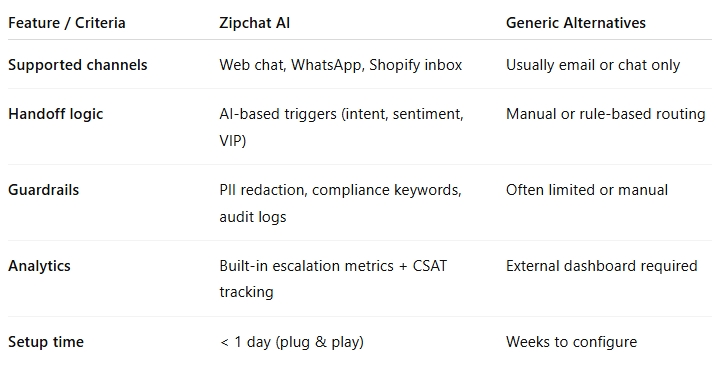
Note: Zipchat isn’t just an escalation router; it’s an AI-first engagement layer that detects risk signals early and automates the handoff before customers churn.
Example: From Chatbot to Support Agent to Resolution (Automated Escalation)
Seeing escalation management in action makes it easier to train agents, configure bots, and standardize customer experience. Here’s a typical ecommerce flow:
Scenario: Customer requests information on a delayed shipment via web chat
Step-by-step flow:
- Chatbot clarification:
Bot: “Hi! I see your order #45321 hasn’t arrived. Can you confirm your shipping address?” - Escalation trigger detected:
Customer responds: “Yes, but I need this delivered urgently, this is a gift!”
→ Negative sentiment + VIP order triggers escalation. - Escalation message to agent:
Bot: “I’m transferring you to a senior support specialist who can resolve this quickly. They’ll see our full conversation so you don’t have to repeat anything.” - Agent engagement:
Agent: “Hi Alex! I see your order is delayed. I’m prioritizing this with our shipping team and will confirm the delivery window within 30 minutes.” - Resolution confirmation & follow-up:
Agent: “Your order is confirmed for express delivery tomorrow. Here’s the tracking link. Please let us know if there’s anything else!”
→ Follow-up survey sent automatically to measure CSAT.
How to Measure Escalation Levels and Management (Methods)
Measuring escalation performance isn’t just about counting tickets; it’s about understanding efficiency, quality, and customer satisfaction across your support workflows. Tracking the right KPIs helps identify bottlenecks, improve automation, and optimize AI handoffs.
Key metrics and formulas

Testing & Benchmarking Tips
- Use A/B or holdout testing to compare escalation policies (e.g., AI-assisted vs. manual routing).
- Monitor trends weekly to catch SLA breaches or repeated failure triggers.
- Combine sentiment analysis with fast resolutions to ensure that CX quality is not compromised.
Tracking these metrics systematically allows you to optimize escalation thresholds, SLA definitions, and AI handoff rules, directly improving CSAT and reducing repeat contacts.
For a deeper dive into relevant KPIs, see our guide on support metrics you should be tracking.
Conclusion & Next Steps
Effective escalation management is more than a process; it’s a competitive advantage in ecommerce that ensures good customer service.. By defining clear escalation levels, SLAs, and AI triggers, you can:
- Resolve issues faster, reduce repeat contacts, and have more satisfied customers
- Improve CSAT and customer loyalty
- Empower agents with clear ownership and context
- Optimize AI workflows to reduce manual workload
Your next steps
- Apply the escalation matrix provided earlier to your workflows. Tailor it for channel, severity, and VIP tiers.
- Implement AI handoff triggers (including unknown intent, negative sentiment, PII, and VIP) to free your agents for high-value cases.
- Track your KPIs — escalation rate, FCR, CSAT, and TTR — and continuously refine SLAs.
- Use templates and tools to speed adoption:
By integrating structured escalation processes, omnichannel routing, and AI-driven decisioning, you turn escalations from a reactive burden into a strategic lever for better CX and operational efficiency.
FAQs
1. What is an escalation matrix?
An escalation matrix is a structured table defining who handles issues, via which channel, and within what SLA. It ensures every ticket is routed to the correct tier (L1–L3) and prevents ambiguity in responsibility.
2. When should a chatbot escalate to a human?
A chatbot should escalate when:
- It doesn’t understand the customer’s intent.
- Negative sentiment is detected.
- The customer is a VIP or high-value account.
- Compliance or PII concerns arise.
- Multiple failed attempts indicate repeated failure.
- Orders are at risk (refunds, delays, cancellations).
For implementation tips, check AI handoff triggers.
3. What SLAs are typical for escalations?
- First response: 5–30 minutes, depending on severity and channel.
- Resolution: 2 hours to 2 business days based on severity (S1–S4).
- Clearly defined SLAs prevent confusion and improve CSAT.
4. How is escalation different from incident management or de-escalation?
- Escalation: Routing unresolved or high-risk tickets to a higher authority.
- Incident management: Focused on IT or operational outages.
- De-escalation: Calming an agitated customer or reducing urgency.
5. What tools support escalation management?
Modern tools provide:
- AI-assisted triggers for chatbots
- Multi-channel routing (web chat, WhatsApp, email)
- Audit logs and compliance guardrails
- Metrics dashboards for escalation rate, FCR, CSAT, and TTR
See our Escalation Management Tools & Software (2025) section for a comparison grid and workflow tips.

Try Zipchat for free