Try Zipchat in Action!
Enter your store URL to see how Zipchat would behave.

5 Shopify Apps for Product Migration & Data Automation: The Ultimate Guide
Overview
In the fast-paced world of e-commerce, time is the most valuable currency. For Shopify merchants, one of the most significant bottlenecks to growth is the manual management of product data.
Whether you are moving from another platform, syncing multiple stores, or launching a new collection, the manual entry of SKUs, descriptions, and images is not just tedious—it is a risk to your business’s scalability.
Definition
Product migration is the process of transferring complex datasets, including titles, SKUs, inventory levels, metafields, and media—from a source (another e-commerce platform, a supplier feed, or a spreadsheet) into a Shopify store. Modern migration is no longer just about ‘moving’ data; it is about ‘transforming’ it to meet the store’s specific business logic.
What This Article Covers
- Comprehensive analysis of top-tier migration apps for 2026.
- Strategic deep-dives into AI-driven content generation and automated sync tasks.
- Technical benchmarks for speed, accuracy, and data integrity.
- Step-by-step diagnostic matrices to match your business needs with the right tool.
The Hidden Costs of “Manual” Migration
Many merchants start by trying to ‘copy-paste’ or use basic CSV imports. However, the hidden costs often outweigh the perceived savings:
- Human Error: Typos in prices or SKU mismatches can lead to financial losses.
- SEO Destruction: Forgetting to map redirects can kill years of organic ranking.
- Broken Logic: Variants, colors, and sizes often get disconnected during manual imports.
1. Products Sync Master
Sync-Master is specifically engineered for high-growth merchants who require more than just a simple import. It functions as a live data bridge that connects your store to any external data source.
When it comes to sophisticated data management, Sync-Master stands in a league of its own. While most apps focus on a simple ‘one-time’ transfer, Sync-Master is built for continuous growth and precision.
Key Value Propositions:
- AI-Powered Content Generation: Use built-in ChatGPT integration to automatically rewrite descriptions or optimize titles for SEO.
- Advanced Data Mapping & Formulas: Apply complex formulas to adjust prices or convert currencies on the fly.
- Scheduled Automations: Set up recurring syncs to keep your Shopify store updated daily without manual effort.
- Multi-Source Support: Process XML, Excel, CSV, or Google Sheets with surgical precision.
- Hybrid Import/Export: Seamlessly move data in both directions between Shopify and external ERP/Supplier systems.
- Metafields Support: Handles Shopify’s complex Metafields structures natively.
Shopify Rating: 4.8/5.0 — Leading in Technical Flexibility & Customer Support.
2. Matrixify: Enterprise-Level Spreadsheet Power
Matrixify (formerly Excel Export Import) remains the gold standard for bulk data handling. It is designed for merchants who prefer managing their entire store structure through localized files like Excel or Google Sheets.
One of its most powerful use cases is the ability to migrate complex entities like Metaobjects and multi-level collections. It provides granular control over every Shopify field, making it the preferred choice for developers executing deep store audits or bulk updates of historical order data.
Key Value Propositions:
- Comprehensive Entity Support: Migrate products, orders, customers, collections, and payouts.
- Metaobjects Support: Handles Shopify’s complex Metaobject structures natively.
- History Preservation: Keep your original Product IDs and creation dates.
Rating: 4.9/5.0 — Excellent for heavy spreadsheet users.
3. LitExtension: Security and SEO First
LitExtension is widely recognized for its robust support of over 140 platforms. Its primary goal is to provide a risk-free migration environment where no data is lost, and SEO rankings remain stable.
Their ‘Smart 301 Redirect’ service is a standout feature, automatically mapping old product URLs to new Shopify structures. This prevents the dreaded ‘404-error spike’ that often follows a platform move, protecting your marketing investment.
Key Value Propositions:
- 301 Redirect Automation: Maps old URLs to new Shopify URLs to prevent 404 errors.
- Customer Password Migration: Allows customers to log in without resetting passwords.
- SEO URL Preservation: Keep your existing URL structure where possible.
Rating: 4.8/5.0 — Secure and SEO-compliant.
4. Cart2Cart: Specialized Replatforming
Cart2Cart is a niche specialist focused on moving businesses from legacy platforms (Magento, OpenCart, PrestaShop) to Shopify. It uses a proprietary ‘Bridge’ technology that connects directly to your old database.
This tool is ideal for those who need to move more than just products. It can transfer customer passwords, order histories, and discount codes, ensuring that your existing customer base experiences zero friction during the platform switch.
Key Value Propositions:
- Automated Data Mapping: Matches categories from your old site to Shopify.
- Review & Coupon Migration: Move customer reviews and discount codes seamlessly.
Rating: 4.2/5.0 — The ‘Wizard’ approach to migration.
5. Migratify: Rapid Marketplace Sync
Migratify is built for speed and accessibility. It allows users to scrape and clone product data from global marketplaces directly into a Shopify admin with minimal configuration.
While it lacks the deep formula engine of Sync-Master, it makes up for it with its ‘one-click’ import capabilities from sites like Amazon, Etsy, and AliExpress. It is an essential tool for drop-shippers and niche curators who need to launch products fast.
Key Value Propositions:
- Instant URL Import: Paste a product link from Amazon or AliExpress and import it.
- Visual Editor: Preview and edit product variants before they go live.
- Batch Scraping: Import entire marketplace categories at once.
Rating: 4.5/5.0 — Best for fast product sourcing.
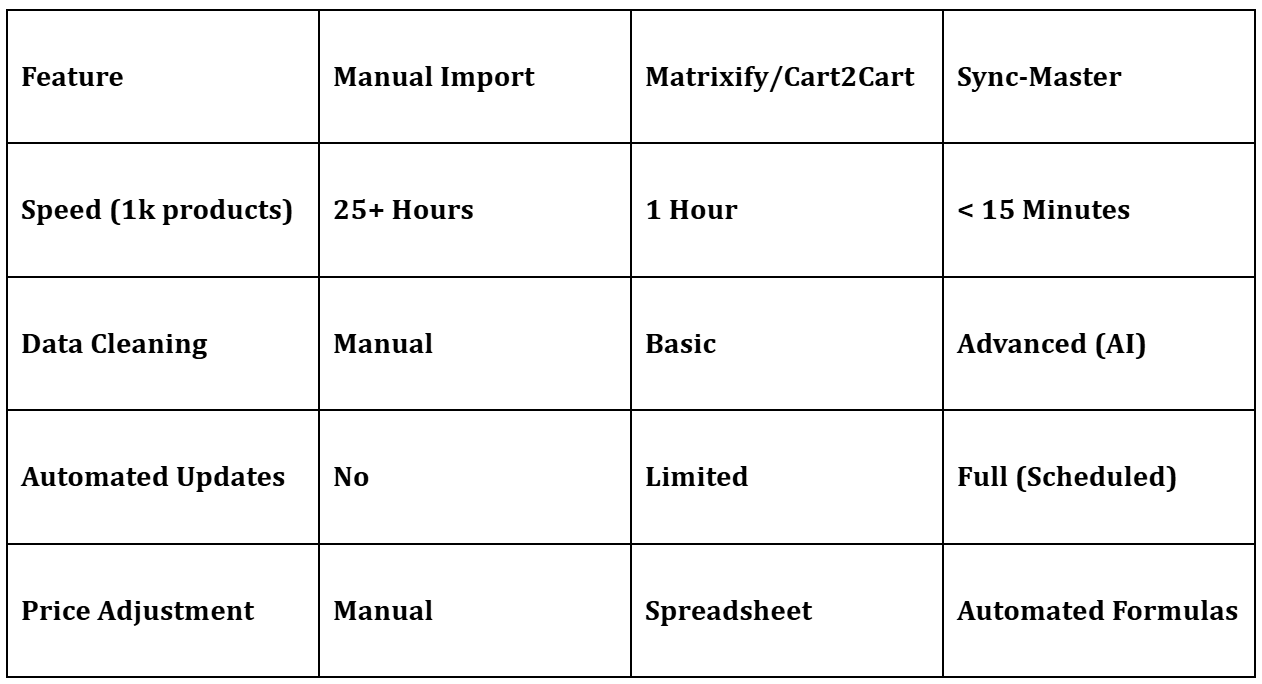
Comparison Matrix: Manual vs. Professional Tools
Conclusion
If you want to build a modern, automated business that uses AI to optimize content and Formulas to control data flow, Sync-Master is the only logical choice. Automation is the bridge between a store that ‘survives’ and a brand that ‘scales’.
While apps like Matrixify offer solid solutions, Sync-Master provides the most comprehensive, future-proof approach by combining automation and AI.
Frequently Asked Questions (FAQs)
Q: Can I automate daily stock updates from my supplier?
A: Yes. Using Sync-Master’s ‘Automated Tasks’, you can set the app to fetch a supplier feed every hour or day, updating inventory levels and prices automatically.
Q: Is it possible to rewrite product descriptions during migration?
A: Absolutely. Sync-Master’s AI integration allows you to generate new, SEO-friendly descriptions or optimize existing ones as they are imported.
Q: Can I apply mathematical formulas to prices?
A: Yes. Sync-Master has a dedicated ‘Custom Fields’ and ‘Formula Builder’ section where you can adjust margins, convert currencies, or round prices in seconds.
Q: Do these apps support Shopify Metafields?
A: Yes, all five tools support Metafields, though Sync-Master and Matrixify offer the most advanced control for mapping custom data fields.
All-in-one Efficiency
If you’re looking for a tool that combines deep technical customization with AI efficiency, Sync-master is the go-to solution. You can explore its full potential with a free trial on the
Beyond simple sync: Automate your Shopify store with AI-powered data transformation, custom formulas, and smart scheduling that keeps your inventory perfect 24/7.